content
During Google’s September 2026 spam update, the share of sites that lost half or more of their Google traffic doubled, from 5% to 10%. That comes from a Diib analysis of 32,569 sites. When an ecommerce organic traffic drop hits in weeks like these, the culprit seems obvious. But is the update really to blame?
Part of the panic in those same days started in rank trackers. According to SEOmonitor, from September 26 trackers reported sharp ranking swings that real users never saw in the results.
The cause was on Google’s side, which was returning incomplete and inaccurate results to automated searches. The chart collapsed while the results people saw stayed where they were (though someone had already forwarded a screenshot of that chart to management).
An update makes a convenient suspect. It explains nothing, you can’t fix it, and any bad month can be pinned on it. That’s why, when we take on search optimization for online stores, we start with what the store controls itself.
There are 3 such places, and we’ll go through them in order. First we’ll check whether the traffic really disappeared. Then we’ll look at products that are no longer for sale. Finally, we’ll deal with product variants that compete with each other without anyone noticing.
A cliff in the tracker or in sales
The tracker chart looks like a cliff, while clicks in Search Console are almost flat. Which one do you believe? A rank tracker simulates searches with a bot and sees what Google shows to bots. Your customers may be looking at entirely different results. Odd to trust a bot over the cash register, isn’t it?
Sometimes the drop shows up in Search Console itself. In September 2025 Google stopped supporting the &num=100 parameter, which showed 100 results on a single page. Impressions fell for 87.7% of the 319 sites analyzed, and average position got worse. Many of the vanished impressions had been generated by scrapers and those same rank trackers.
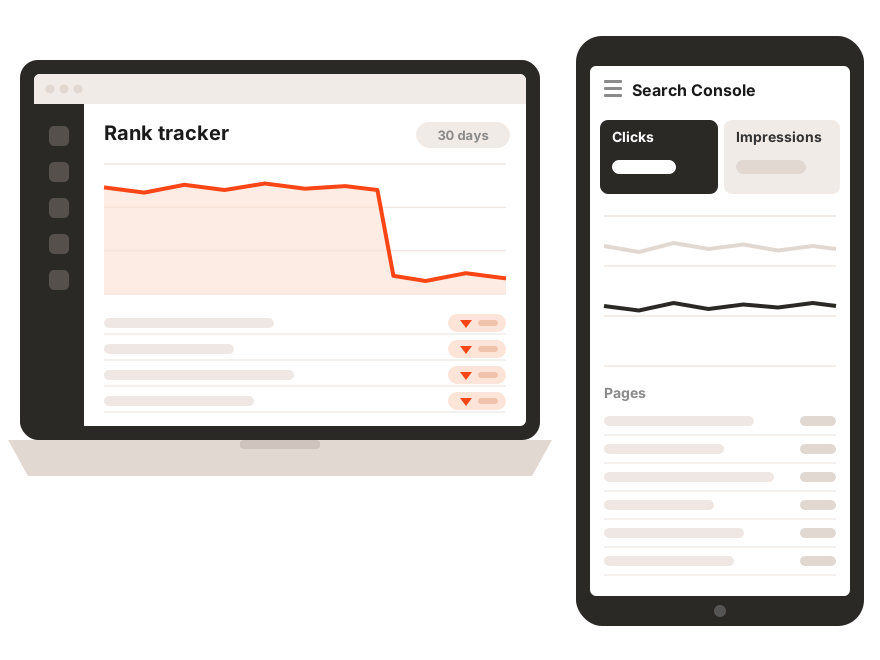
A tracker and the impressions report show how tools see you. Money comes from clicks and orders, so look at those first.
What to open first in Search Console
Google has its own guide for these cases, and it’s more prosaic than any conspiracy theory. Take 16 months of data and compare the last 3 months with the same period a year earlier. A drop that comes back every fall is what Google calls, without any drama, seasonality.
Then sort pages by lost clicks. Did categories sink? Look for the cause in demand or competitors. Did product pages sink? Keep reading, because the next sections are about them. Since November 2025 Search Console has had a branded queries filter, and it quickly shows who went missing, new customers or the people who searched for you by name.
The shape of the chart hints at the cause too. Google advises against radical changes when a page has slipped only a few positions. It often recovers on its own, and a hasty rework can break what was working.
| What you see | Possible cause | Where to look |
|---|---|---|
| A sharp site-wide crash | A technical issue or site downtime | Page indexing, Crawl stats |
| A slow decline on certain pages | A page-level error such as noindex | URL Inspection |
| Stable impressions, falling clicks | Snippets weaker than competitors’ | Titles, rich results |
| A drop in the same month every year | Seasonal demand | Google Trends, 16 months of data |
| Big ranking losses across many queries | An algorithm update | A quality self-assessment of the whole site |
Compare with the same period last year and look at clicks by page type. If product pages took the hit, the problem most likely sits in the catalog.
Image search is search too
The Performance report shows web search by default. Google recommends switching the search type and checking Image, Video and News separately. For a store with good product photos, image search can bring a noticeable share of visits, and it may be the part that dropped.
The check takes 2 minutes. If web search is flat and images fell, look at what changed with the photos. File URLs, sizes, alt text, the CDN? Here an update is the least likely suspect.
The product is gone. Delete the page?
We hear this question after every season. A collection sells out, a model is discontinued, a supplier changes the SKU. A hand reaches for the Delete button, and with the page go the rankings and links it built up over the years.
Let’s start with a temporary stockout. Leave the page in place and set OutOfStock in the structured data. Google’s John Mueller has warned, though, that Google may treat an empty product page as a soft 404 and drop it from results. So keep the description, specs, restock date and similar models on it.
And the rest of the site? According to Mueller, one sold-out product doesn’t affect it. So there’s no point deleting such pages “just in case.” A sold-out model will be back in stock, and rankings lost to a deletion have to be earned all over again.
Discontinued products, 3 scenarios
If a new model directly replaces the old one, set up a 301 redirect to that exact model. Google treats a permanent redirect as a strong signal that the new URL should be canonical, so what the old page built up moves to where it’ll be useful.
No replacement, but the page has traffic and backlinks? Keep it as a reference page with Discontinued in the markup and a selection of alternatives. People searching for the old model by name will get an answer and something to buy.
If nobody needs the page, return a plain 404. The 404 vs 410 debate can be closed. Google’s documentation states unambiguously that it handles all 4xx codes the same way, except 429.
| Situation | What to do with the page | Availability value |
|---|---|---|
| Temporarily out of stock | Keep it, add a restock date and alternatives | OutOfStock |
| Discontinued, a direct replacement exists | 301 to the new model | Not needed, the page redirects |
| Discontinued, no replacement, the page has traffic | Keep it as a reference page with alternatives | Discontinued |
| Discontinued, nobody needs the page | 404 or 410 | Not needed |
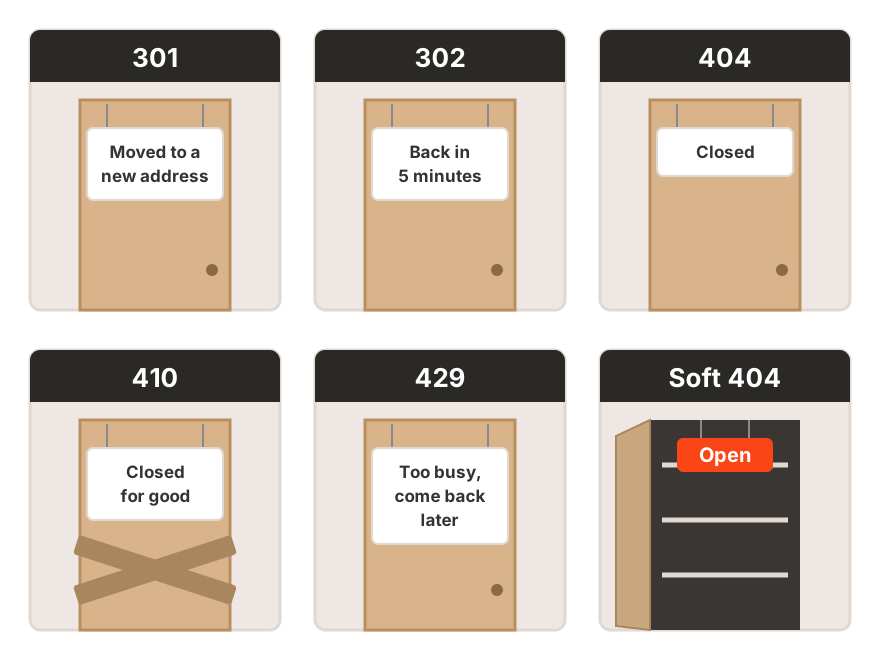
301 means a permanent move. 302 is a temporary move, which Google takes as only a weak signal that the new URL should be canonical. 404 and 410 say the page is gone, and Google handles them the same way. 429 means “too many requests,” and Google reads it as server overload and slows down crawling. A soft 404 is a page that returns a 200 code but looks empty to Google.
A homepage redirect is a polite brush-off
The most common mistake is redirecting every vanished product to the homepage or a broad category “so nothing gets lost.” To a shopper, that’s like a salesperson who answers a question about a specific model by pointing at the mall entrance. Technically an answer, isn’t it?
Glenn Gabe of G-Squared Interactive has shown in case studies that Google may treat such redirects as soft 404s. The page then passes nothing on and simply drops out of the results. The outcome is the same as with a plain 404, except someone also spent time setting up the redirects.
After a mass removal, menus, the blog and neighboring product pages often still link to the old URLs. Point those links straight at the final pages. We’ve described the whole internal linking system in a separate article.
A vanished product is no reason to delete the page. A redirect should lead to a similar product, and a 404 beats a redirect to “somewhere.”
Red dress, blue dress, 1 product or 2
To a shopper, a red and a blue dress in the same cut are one product in 2 colors. To Google, they may be 2 pages with the same text competing for the same query. Until you explain that they’re related, Google will treat them as rivals.
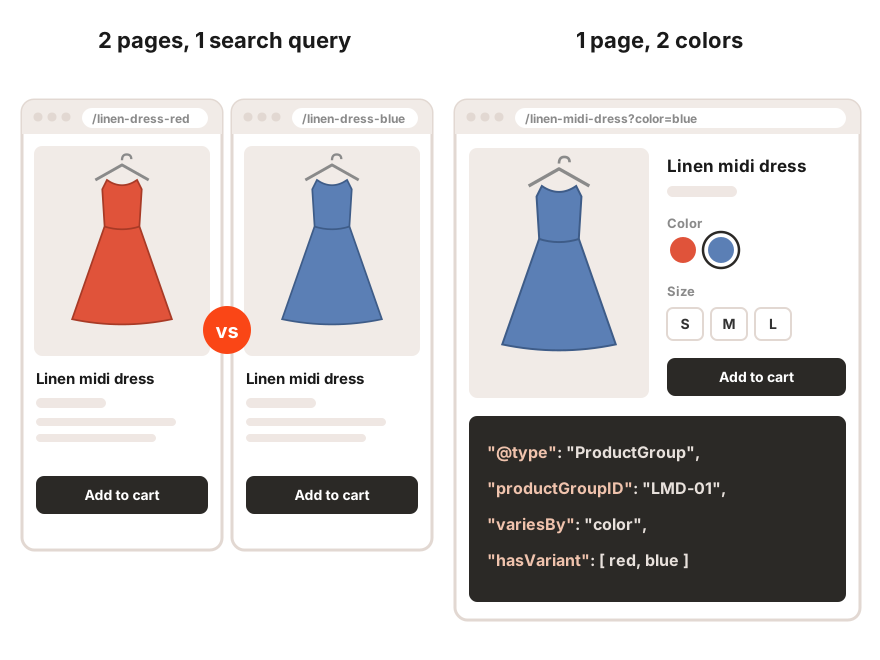
Google describes 2 valid setups. In the first, all variants live on one page, and the color or size is selected with a URL parameter. In that case the group should have a single canonical URL. In the second, each variant has its own page and none of them is the main one, so there’s no shared canonical.
How do you choose? A separate page makes sense when people search for the variant itself, say, when “red dress” plus your brand name has noticeable search demand. People rarely search for a size on its own, while color searches are more common. Without demand of their own, separate URLs only multiply near-identical pages, and we’ve covered where that ends in our article on keyword cannibalization.
A canonical Google may ignore
A popular compromise gives every color its own page with its own photo and price, while the canonical on all of those pages points to the “main” color. It looks like a solution everyone can live with, Google included.
For Google, though, a canonical is a signal, a strong one, and the final call is Google’s. When pages differ noticeably, Google may choose the canonical URL itself. Search Console then shows the status “Duplicate, Google chose different canonical than user.” Seeing it on product variants? Then the setup needs another look.
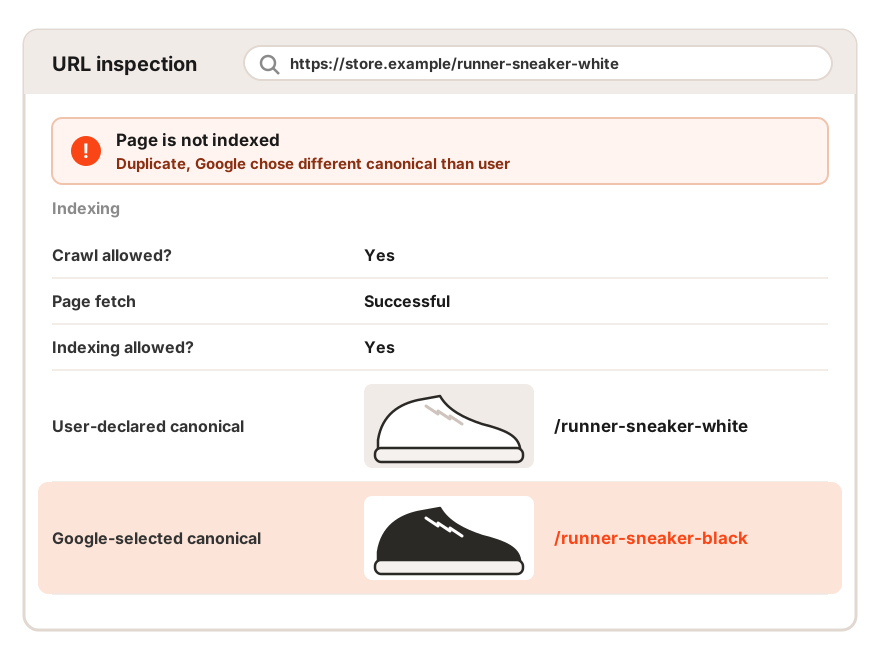
ProductGroup explains the family ties
ProductGroup markup gathers variants into one family. The hasVariant property lists the variants, variesBy says how they differ, and productGroupID sets the shared ID of the group. If the ID is given for both the group and the variants, the values must match.
Stores often miss the technical requirement that each variant open at its own URL, for example with a color parameter. That URL should show the right photos, price and availability for that exact variant, and the variant should be ready to add to the cart.
Keep the variants of one product in one family. Only a variant that people search for separately needs a page of its own.
Post-season checklist
After a sale, the assortment often changes in bulk, and the mistakes on this list show up in batches. Go through it before you start deleting products.
- Compare clicks with the same period last year, separately for categories and product pages.
- Switch the search type to Image and check whether image search has dropped.
- Export the products that went off sale and sort them using the table above.
- Check for mass redirects to the homepage or broad categories.
- Update internal links to removed and redirected products.
- Find product variants that have separate URLs but no demand of their own.
- Review the Page indexing report for new soft 404s and canonicals chosen by Google.
On a large catalog, you can’t do this by hand. It’s simpler to crawl the site, export status codes and canonical URLs, and then match them against the list of discontinued products and the Page indexing report.
The mismatches between these 3 lists are your problems. That cross-check is exactly where we start a technical review of the whole catalog when a store hands this work over to us.
Ecommerce organic traffic drop FAQ
How can you tell if traffic dropped because of a Google update?
Compare the date of the drop with Google’s update history and see which pages fell. Big ranking losses across many queries in the days of a rollout point to it. Drops on individual product pages are more often caused by the catalog itself.
Which is better for a removed product, 404 or 410?
For Google there’s no difference. Its documentation says all 4xx codes except 429 are handled the same way.
Does an out-of-stock product hurt the rest of the site?
No, according to John Mueller it doesn’t. The empty product page itself can drop out of results as a soft 404, so keep useful information on it.
Can you redirect a discontinued product to a category?
Yes, if the category is genuinely close to the product. Google may treat a redirect to the homepage or a broad category as a soft 404.
Does every color need its own page?
Only when people search for that specific color. Otherwise keep the variants on one page with ProductGroup markup.
Before you blame Google
Updates do reshuffle the results, and you can’t influence them. Vanished product pages, redirects to “somewhere” and competing variants can be fixed within a few weeks, and if left alone, they’ll repeat with next season’s catalog changes.
After sales, many stores refresh their assortment, and every page deleted at random takes its links with it. If you’d like to go through this list ahead of time, talk to Advantrise, and we’ll review the catalog before the assortment starts changing.
Subscribe to our newsletter