content
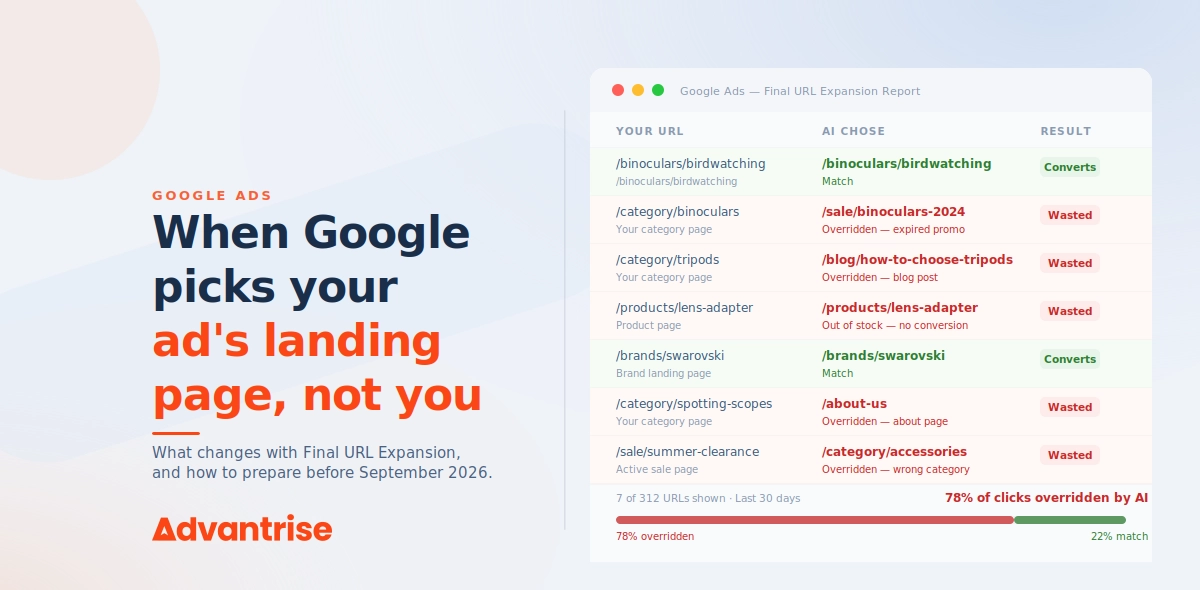
Nobody asked you. Right now, Google is deciding on its own which page of your site receives your paid click. No heads-up, and often it’s a page you would never have picked yourself. By September 2026 this behavior becomes mandatory for everyone, with no way to switch it off. Stores that prepare their catalogs early walk away with a quiet edge. Stores that don’t will be paying for clicks that lead nowhere.
For years, one simple rule held. You build the ad, you choose the page it points to. Ad copy and landing page were set up together, around one intent, carrying one message. When something didn’t line up, the fault was yours, but so was the control.
That rule has been quietly retired. Not with a big stage announcement, but with a settings line that’s easy to miss in the flood of AI news. In paid campaigns, Google now decides for itself which page of your catalog the click goes to. It reads your entire site, looks at the user’s query, and picks the page it considers most relevant. The page you specified becomes more of a suggestion than a decision.
This is the second article in a series on the Advantrise blog. The first covered the organic side, how to make a catalog readable for AI systems so they cite your pages. Now the flip side of the same coin: AI reading that same catalog, except this time to decide where your paid traffic lands. And the bare page that was merely a missed opportunity in organic search becomes wasted budget here.
The feature is called Final URL Expansion (FUE), and it rewrites the rules for anyone paying to advertise a catalog.
What actually changed, in brief
Final URL Expansion (FUE) is an AI Max feature in which Google itself chooses which page of your site receives the paid click, instead of the fixed page you specified in the ad. The algorithm analyzes the query, the ad group’s theme, and your entire site, then sends the user to the page it judges best for that specific query.
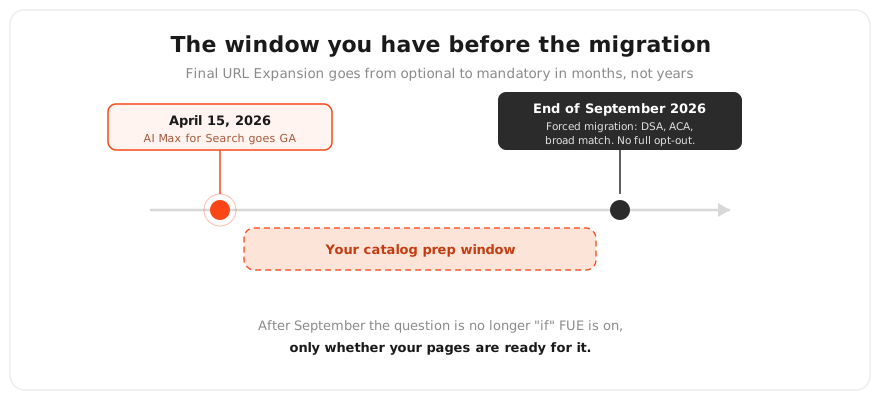
Why this matters right now. AI Max for Search reached general availability on April 15, 2026. By the end of September 2026, Dynamic Search Ads, Automatically Created Assets, and campaign-level broad match settings get migrated into it automatically. There is no full opt-out. So the question isn’t whether FUE switches on in your account. It’s whether you’ll be ready when it does.
We touched on this September deadline in a wider context when we broke down everything Google showed at Marketing Live 2026. There it was one item on a list. Here it’s the main event, because it directly decides where your money goes.
Why eCommerce catalogs take the hardest hit
A lead-gen site has a handful of landing pages. A blog has posts. A catalog has hundreds or thousands of pages all at once. Categories, subcategories, filters, product cards, tags, last year’s promos, technical pages that were never meant for human eyes.
When FUE reads the site, it chooses from all of it. And this is where a bare or weak page stops being merely invisible. It becomes a destination for clicks you’re paying real money for.
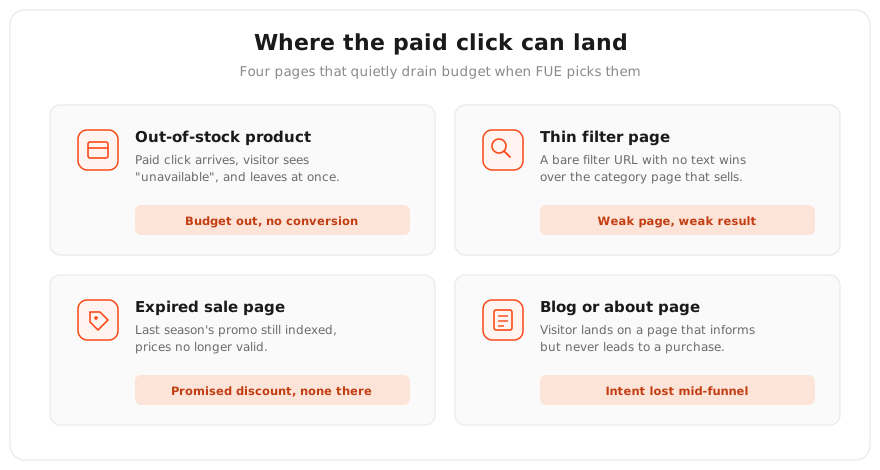
Here are the specific scenarios we see in accounts:
- A product card with nothing in stock suddenly starts collecting paid clicks. The visitor lands, sees “unavailable,” and leaves. That click has already been paid for.
- Instead of the strong category page that actually sells, the winner turns out to be a thin filter page with no text on it at all.
- Last year’s promo page, which nobody remembered to deindex, keeps catching traffic even though its prices and terms expired long ago.
- Shopping campaigns quietly lose traffic because FUE pulls in queries they used to serve.
- Instead of a page that leads to a purchase, the visitor ends up on the blog or the about page.
The birdwatching gear store we mentioned in the first article ran into exactly this. After moving to AI Max, roughly 30% of paid clicks were going to an old “binoculars sale” page from the previous season that nobody had closed off from indexing. The sale was long gone, but by formal signals the page stayed the most relevant match for any query containing “sale.” The sequence repeated itself over and over. Someone searched “binoculars sale,” saw an ad promising a discount, clicked, landed on a page with no discount, and left immediately. Every one of those clicks cost money and delivered nothing except a rising bounce rate. Over a month, the waste added up to what a week of a healthy campaign would have cost.
How the AI decides where to send you
FUE doesn’t operate alone. It’s switched on in tandem with Text Customization, and you can’t enable one without the other. The logic goes like this. If Google picks the page itself, it also has to rewrite the ad’s headlines to match that page, so the ad and the landing page don’t contradict each other.
Text Customization is an AI Max feature that lets Google automatically generate and adapt ad headlines and descriptions to fit the user’s query and the chosen page, rather than relying only on the variants you wrote in advance.
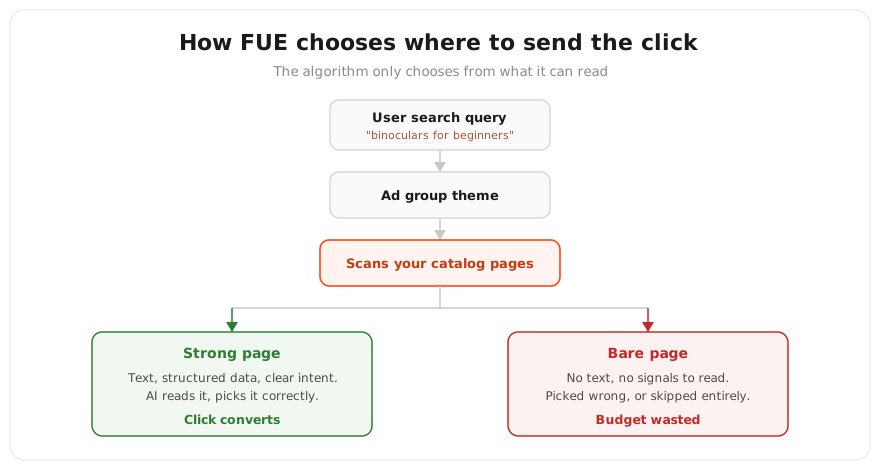
The page selection itself follows a simple chain. The algorithm takes the user’s query, looks at your ad group’s theme, scans the pages of your site, and picks the one it believes matches the intent best. Managing this correctly – and making sure the algorithm picks strong pages, not weak ones – is one of the new core responsibilities in eCommerce PPC management after the AI Max transition. The key word is “scans.” It only chooses from what it can see and understand.
And what exactly AI sees and understands on a page is something we unpacked in detail in the first article of this series. It’s the same set: text, structured data, headings. A page the machine can’t properly read either won’t be chosen at all, or will be chosen wrongly, because the algorithm misjudges what the page is about.
One thought worth pausing on. Organic readability of your catalog and paid page selection are not two separate jobs. They’re one and the same machine-readability, seen from two sides. The page that AI citation understands well is the same page FUE will pick correctly. You prepare the catalog once and win twice.
The control you still have
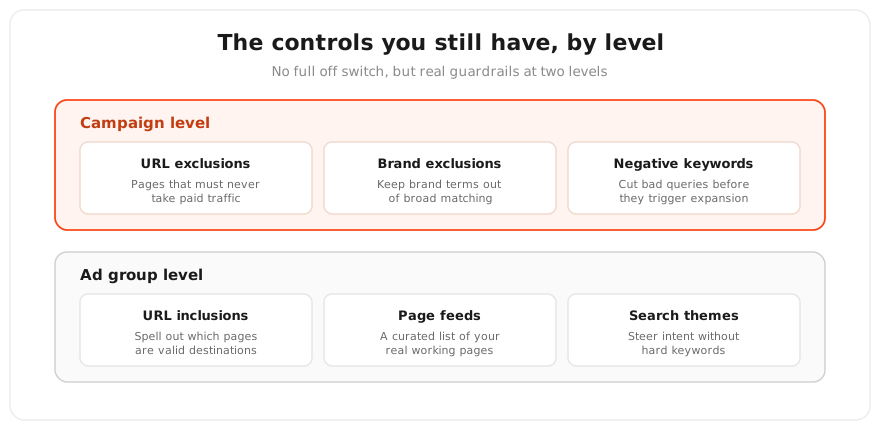
There’s no full off switch, but the levers are real. Most of the budget in AI Max flows through FUE, which makes these controls the main way to keep money from leaking, not some minor settings. Here’s what you have and where it lives.
- URL exclusions, campaign level. A list of pages that should never receive paid traffic. This is where the blog goes, the about page, the cart, login pages, thank-you pages, return policies, expired promos. Anything that doesn’t sell or is no longer current.
- URL inclusions, ad group level. The reverse move, spelling out which pages are acceptable as destinations. Useful when you want to narrow AI’s choice down to a verified set.
- Page feeds with custom labels. These hand Google a managed list of priority pages with labels attached. It’s a way of telling the algorithm “these are my real working pages, stick to them.”
- Search themes and negative keywords. These cut off irrelevant queries before they ever trigger an expansion onto a random page. If the query is filtered out, AI never gets the chance to pick a bad page for it.
- Inventory signals. Keep your stock data clean so AI doesn’t route paid traffic to products that aren’t on the shelf.
A page feed is a list of your site’s URLs uploaded to Google Ads that you consider fit for advertising, with optional labels for grouping. It gives the algorithm a managed set of pages to work with instead of the whole site.
Search themes are descriptive phrases you use to point AI toward the right kinds of search queries, not as hard keywords but as intent signposts. A phrase sets the topic within which the algorithm looks for relevant queries.
The practical logic is simple. First, exclude the obviously unfit pages through URL exclusions. Then weed out bad queries with negatives and search themes. And only then, if you need more precision, narrow further with inclusions and page feeds.
Getting the catalog ready for what Google will switch on anyway
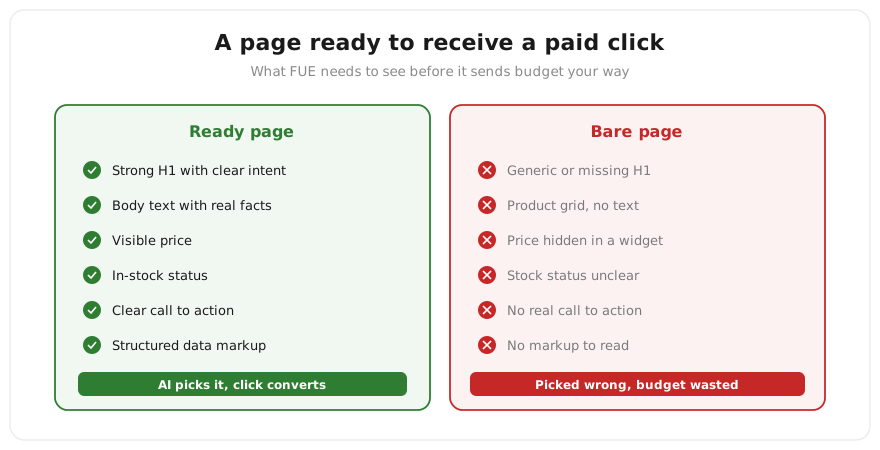
Controls contain the damage, but they’re not the main work. The main work is starting earlier and preparing the pages themselves. By the end of September, FUE switches on one way or another, and the only open question is what AI will be choosing from. If it’s choosing from strong pages, you win. If it’s choosing from bare ones, you lose, no matter how many exclusions you stack up, because you can’t predict every gap.
What this means in practice:
- Every page that can receive traffic has to sell. A clear headline, copy with facts, a visible price, stock status, an obvious call to action. If a page isn’t ready to take a paid click, it should be either fixed or excluded.
- Technical cleanliness of the catalog. The unredirected duplicates and stale pages we talked about in the first article are no longer just an SEO problem. They’re pages FUE can pick as a destination. Collapse duplicates into one version with redirects, remove or close off what’s outdated.
- Structured data on the pages, so AI correctly understands what each page is and whether it fits the query.
- Anything that isn’t ready stays in exclusions while you fix it. Better to hide a page temporarily than to let AI route paid traffic onto it.
It helps to keep a deliberate set of working pages you consciously put forward for traffic, with clean internal linking between them. How to organize that is covered in our piece on internal linking for eCommerce.
Who wins and who loses with FUE
The data on FUE is still contradictory, and that’s worth knowing before you switch anything on. Some agencies report revenue lifts. Others have seen cases where the overwhelming majority of AI-generated queries produced zero conversions. The spread isn’t caused by the feature itself. It’s caused by the catalog the feature runs on.
The winners are stores with a large catalog of clean, strong pages covering many different intents, a healthy feed, and configured controls. For them, FUE genuinely captures the long tail of queries and walks each user to the precise page. What used to take dozens of hand-built ad groups, the algorithm now does on its own.
The losers are catalogs with thin pages, duplicates, expired promos, and no guardrails at all. For them, FUE is a machine that methodically finds their weakest pages and routes paid traffic onto them. Not because the algorithm is bad. Because it was given a bad set to choose from.
And here’s the takeaway that will stay true even after the feature names change. FUE doesn’t create the problem, it puts a spotlight on it. A weak catalog was weak before AI Max too. You just had a buffer back then, steering traffic past the weak pages yourself by specifying the right one by hand. That buffer is gone, and every weak page is now visible to an algorithm that has no idea it’s weak.
FAQ about Final URL Expansion
Can Final URL Expansion be turned off completely?
Until the forced migration completes in September 2026, the feature can still be disabled in campaign settings. After the migration there will be no full opt-out, only containment through URL exclusions, inclusions, and negatives. Which means the “just don’t enable it” strategy comes with an expiry date.
Are FUE and Performance Max the same thing?
No, but they’re related. A URL expansion mechanic has existed inside Performance Max for a while. What’s new is that the same approach is now arriving in standard Search campaigns through AI Max. Different products, same underlying idea: Google picking the landing page instead of you.
How do I see which pages the AI is picking?
AI Max reports include data on which landing pages the algorithm has been sending traffic to. It’s the first thing worth checking after enabling. Look for blog pages, expired promos, or out-of-stock cards among the chosen destinations.
Will FUE hurt my Shopping campaigns?
It can, through cannibalization. FUE is capable of pulling in queries that your Shopping campaigns used to serve. That’s not a reason to walk away from it, but it is a reason to watch traffic distribution between campaigns closely after switching on.
What happens to pinned assets in my ads?
With Final URL Expansion enabled, RSA asset pinning is not honored. Google reserves the right to rewrite headlines and descriptions to fit the chosen page, so rigidly fixed copy isn’t guaranteed in this mode.
What to do with all of this
Control over the landing page is no longer fully yours, and there’s no rolling that back. The September deadline arrives whether you’re ready or not. So the real choice right now is simple. Prepare the catalog yourself, or let the algorithm drain budget onto your weakest pages until you finally spot it in the reports.
Everything described above can be done on your own. Exclusions, inclusions, page feeds, catalog cleanup, structured data, all of it is within reach. But the point of risk here is specific and has a date on it. Before September 2026 you need to decide which pages deserve paid traffic and which should be hidden, and you need the first group brought up to standard in time. A mistake here isn’t measured in rankings. It’s measured in budget burned on clicks that go nowhere.
September is closer than it feels, and a catalog doesn’t get rebuilt in a week. While some stores wait for the migration to switch itself on and start draining budget onto their weakest pages, others are preparing their catalogs now and will walk into September with an edge. Which side you’re on is your call, but the window for calm, unhurried preparation closes a little more every week. Get in touch while the migration is still ahead, and together we’ll find the pages that risk taking paid traffic for nothing, before Google starts charging you for them.
Subscribe to our newsletter