content
There’s already more written about GML 2026 than there are features Google actually showed on stage. The industry has slipped back into that familiar phase where everyone is busy explaining to everyone else what just happened, and the enthusiasm level in those explanations keeps growing faster than the volume of real-world use cases.
At Advantrise, we watched the full presentation, went through the official materials, and talked to a handful of clients who have already started testing the first wave of these tools. This piece is an attempt to take off the rose-tinted AI gold rush glasses and look at the announcements through duller ones – the kind with frames forged from professionalism and a healthy dose of distrust.
GML 2026 breaks down into four logical buckets. And as it turns out, not all of them carry the same value for everyone.
What Google showed at GML 2026, and where you’ll see these changes
Instead of a flat list, here’s a short walkthrough of how each tool will reshape your day inside Google Ads.
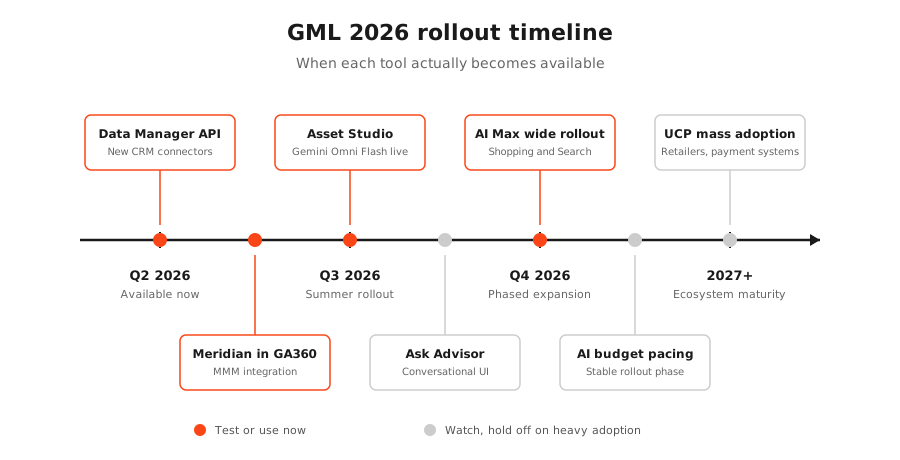
Ask Advisor – Gemini inside your account (currently in beta). Google Ads is rolling out a conversational interface where you can talk to your account like you’d talk to an analyst. “Why did ROAS drop on this campaign last week?” “Which keywords burned the most budget without converting?” “Suggest a budget split for next quarter accounting for seasonality.” Gemini answers, with Google Ads, Analytics, Merchant Center, and Marketing Platform all wired in at the same time. The product is currently in beta for English-language accounts globally, with broader rollout planned later this year. Technically it’s a new panel in the account UI. Practically it’s Google trying to shorten the distance between asking a question and acting on the answer – no jumping between platforms, no hunting for the right report, no CSV exports. You ask, you get a consolidated answer.
AI Max for Shopping and Search. A one-click toggle that brings AI Max capabilities to existing Shopping campaigns, with similar functionality already live for Search. Inside your account, you’ll see the option to convert Standard Shopping and Search campaigns into AI Max with a few clicks. Google takes over more of the targeting, creative, and query-matching decisions. The algorithm decides which queries are relevant (including ones you didn’t explicitly add), how to combine creative assets, how to allocate bids across queries with different intent. You see fewer settings in the interface and more “signals” (audience signals, asset groups, conversion goals) that feed what the algorithm learns from.
One open question Google didn’t answer at GML 2026: where does this leave Performance Max? PMax was supposed to capture conversational and long-tail queries within shopping inventory – which is what AI Max for Shopping is now positioned to do too. Until Google provides a clear framework for when to use which, the safer move is to test AI Max on a campaign where you already have a baseline, watch what it finds, and treat the PMax question as genuinely open.
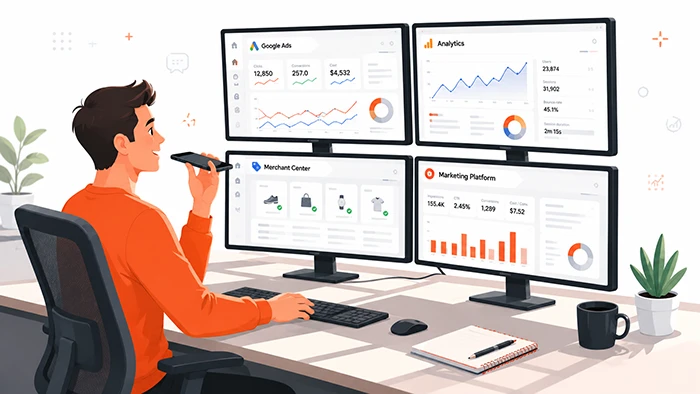
Asset Studio with Gemini Omni Flash. The most visible change for anyone who spends real time on creative. Google is folding Gemini Omni Flash – its multimodal model focused on video generation and editing – into Asset Studio. The model accepts text, image, audio, and video as inputs, and primarily outputs video with audio (with image and copy variants on the side). Write a brief in plain text and get video variations back. Upload a single product image and generate dozens of variants for different placements, formats, and aspect ratios. Asset Studio with Gemini Omni Flash rolls out in Google Ads from summer 2026, English first.
Universal Commerce Protocol (UCP) and Universal Cart. The biggest infrastructural change, and the slowest to fully materialize. UCP is an open industry standard that lets agents, merchants, and payment providers exchange data without custom integrations. Universal Cart is a persistent shopping cart that lives across every Google surface, including Search, the Gemini app, YouTube, and Gmail. A user adds a product in Search, sees the price in YouTube, pays through Gemini. For advertisers this means your products can surface in contexts they couldn’t reach before. Adoption by retailers and payment systems will be gradual – it won’t apply to every catalog from day one.

Data Manager API with new connectors. An infrastructure-level update that’s easy to overlook. 2026 brings direct connectors for Mailchimp, ActiveCampaign, and Klaviyo, and data flow setup can now happen programmatically instead of through the UI. Your CRM, email platforms, and Google Ads now plug together in a few clicks instead of a week of developer time. For businesses without a deep technical team, this is the most underrated piece of GML 2026.
Meridian in Analytics 360 and Qualified Future Conversions. Google is folding Meridian – its open-source marketing mix model – directly into Analytics 360, and introducing Qualified Future Conversions, a predictive metric powered by Gemini. You see not only what happened, but what’s likely to happen next. Not a replacement for attribution, but an additional layer.
AI-powered budget pacing. New bidding and budgeting tools let AI distribute your spend itself, reacting to shifts in consumer behavior. It shows up as a new toggle in campaign settings that lets Google handle pacing on its own. The algorithm optimizes around forecasted seasonality and demand patterns rather than a fixed daily budget.
What assumptions all of this is built on
This is where we get to the part most GML write-ups just didn’t have room for – whether by accident or out of deference to the optimistic tone.
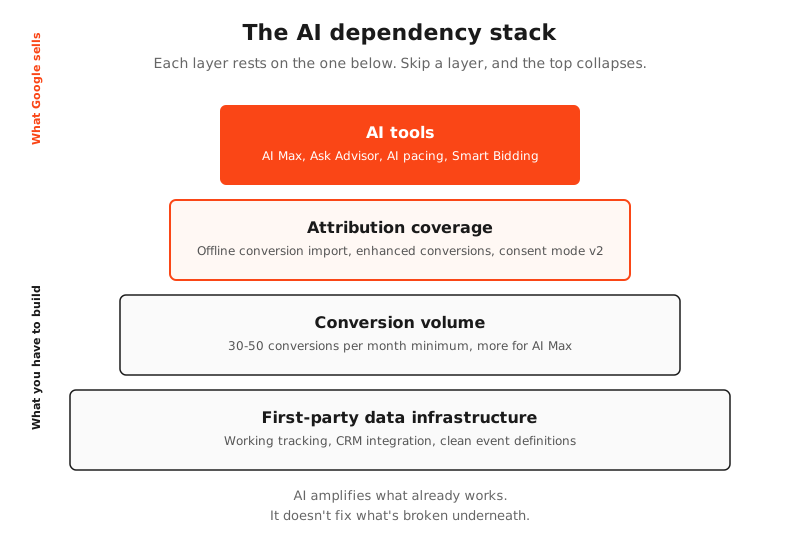
AI Max, AI pacing, next-generation Smart Bidding, even Ask Advisor – all of it rests on one premise. Your account has enough data for AI to actually learn something. And “enough” isn’t an abstract concept. There are concrete thresholds below which these tools either don’t work at all or work worse than plain manual settings.
Conversions per month. For smart bidding strategies, Google officially recommends a minimum of 30-50 conversions per month at the campaign level. For AI Max, you’ll want more, because the algorithm is optimizing across more parameters at once. An account with 10-15 conversions a month literally doesn’t give AI enough signal to finish the learning phase. The algorithm stays stuck in permanent learning mode, produces unstable results, and that gets read as “AI doesn’t work.” It would have worked – if there had been anything to learn from.
Attribution coverage. AI Max and Ask Advisor perform better the more complete your tracking is. A properly configured GA4 setup, offline conversion import from your CRM, enhanced conversions, consent mode v2 – this isn’t a nice-to-have, it’s the baseline infrastructure. Without it, AI optimizes against an incomplete signal. Without offline conversions, for instance, the algorithm only sees form fills, not closed deals, and starts driving more form fills that never close. (For the tracking side of this, Google Tag Gateway and what it actually solves covers where data loss happens and how to close that gap.)
Feed size for Shopping. AI Max for Shopping does best with catalogs of 500 SKUs and up. A smaller catalog means less room for algorithmic maneuvering. A 50-product shop on AI Max is an algorithm shuffling the same 50 products and finding nowhere new to pull extra value from.
Budget below a certain threshold. Google doesn’t publish an exact number here, but industry practice is clear. Accounts spending less than $2,000-3,000 per month on AI Max often perform worse than manually configured Performance Max or Standard Shopping. The reason is straightforward – not enough traffic volume for the algorithm to make statistically meaningful decisions.
This is the right moment to introduce a term that comes up less often in industry conversations than it should. AI overdelegation is when an advertiser hands the algorithm more control than the algorithm can responsibly use. Not “AI is bad” – “in this specific account, AI doesn’t have enough to work with.” The distinction matters, and it’s exactly where half of the “we tried AI Max and our ROAS tanked” stories actually break down.
Who actually benefits from Google’s AI rollout
The winning profile is defined by four conditions, all at once – not any one of them in isolation.
The first is conversion volume of 100+ per month at the account level. Not “we had 100 conversions last year” but stable, recurring 100+ every month. This is the floor below which smart bidding simply doesn’t have enough data to stratify.
The second is mature first-party data infrastructure. A CRM that pushes offline conversions back into Google Ads. Consent Mode v2. Enhanced conversions. These aren’t buzzwords – they’re a specific setup, and without them, Meridian, QFC, and AI Max all lose half their value.
The third is a catalog of at least a few hundred SKUs, or significant campaign diversity. AI needs room to move. With three products in your catalog, AI isn’t going to perform miracles – it’s just going to reshuffle the same three products.
The fourth is a healthy ad budget, big enough to absorb the learning phase of new tools. Testing AI Max usually means 4-6 weeks of unstable results before the algorithm settles into stable performance. Accounts running thin on budget often don’t have that runway.
If all four conditions are met, GML 2026 genuinely opens up a new level of automation for you. AI Max can cut manager time by 15-25%, Asset Studio removes the need for a designer on standard formats, and Meridian gives you something that previously took half a year to build by hand. Getting the foundation right to unlock all of this is part of what professional Google Ads management covers – the tools are only as good as the account structure and data feeding them.
This is the client profile Google is positioning these tools for. And fairly so – for that profile, the new generation really is better than what came before.
Who doesn’t benefit from this rollout (and sometimes loses ground)
The mirror profile:
- Small accounts with 10-30 conversions per month
- B2B with long sales cycles and few monthly demo requests
- Businesses without offline conversion import (no real revenue signal, only form submissions)
- Local businesses with limited geography and a small feed
- Niches with low search volume
A small handmade ceramics shop in Bristol with a catalog of 80 items and 25 monthly conversions switched to AI Max for Shopping during a test period. The result was a 22% drop in ROAS compared to Standard Shopping. Not because AI Max is bad – because the algorithm didn’t have enough signal for self-tuning. 25 conversions split across 80 SKUs meant each product averaged less than one conversion per month, and smart bidding couldn’t make a single confident decision.
This isn’t a one-off. It’s the systemic situation for a meaningful slice of small and mid-sized businesses. And this is the place for another term that doesn’t get talked about openly often enough. Algorithmic blind faith is when an advertiser trusts “AI will figure it out” even when the data objectively isn’t there for figuring out. The algorithm does what it can. With 25 conversions, it can do very little – and that isn’t the algorithm’s fault.

A separate risk for B2B with long sales cycles. AI pacing and AI Max optimize against events they can see right now. If your real conversion is a closed deal four months after the click, and the algorithm only sees a demo request the day of the click, it will scale up demo requests that will never close. The more delegation, the faster that gets scaled. (We covered the broader pacing problem in why B2C budget logic breaks B2B accounts.)
What’s worth testing right now, regardless of account size
Not everything from GML 2026 requires 100 conversions a month and an enterprise-grade setup. Three of the tools are useful to almost anyone – and here’s where you’ll find them in your account.
Asset Studio with Gemini Omni Flash. Available in Google Ads from summer 2026. You’ll find it under Tools and Settings → Asset Library → Asset Studio. Step by step:
- Upload a text brief or a source product image.
- Pick your target format (image, video, responsive search ad copy, vertical video for Shorts).
- Set parameters: aspect ratio, brand tone, key messages.
- Gemini generates 5-10 variants based on your input.
- Edit variants directly in the interface or export them to the Asset Library.
For you, this means creative work that used to need a designer or 2-3 hours of marketer time now happens in 5-10 minutes. It’s not a replacement for a brand designer, but for standard formats (responsive display, vertical video for YouTube Shorts, static Shopping creatives) it’s genuinely faster and cheaper. And the testing economics shift too – you can generate 30 creative variations in a day and test each one.
Meridian in Analytics 360. Available for GA360 accounts. You’ll find it under Analytics 360 → Advanced Analysis → Marketing Mix Modeling. Step by step:
- Connect data sources: Google Ads, Meta, TikTok, organic, direct, email.
- Upload historical sales data (12-24 months minimum).
- Configure model parameters (seasonality, base sales, external factors).
- Meridian runs an MMM analysis and returns findings: which channel contributes what to revenue, what your incrementality-based ROAS looks like (versus last-click), where you’re over-invested.
- Adjust your channel budget split based on the results.
The practical impact is that budget allocation decisions stop being based on last-click attribution in GA4, which systematically inflates paid channels and underweights organic, brand, and retargeting. Meridian gives you a more honest read on incrementality. Especially useful for businesses running multi-channel marketing.
Data Manager API and the new connectors. Available for all Google Ads accounts. You’ll find it under Google Ads → Tools and Settings → Data Manager. Step by step:
- Pick the data source you want to connect (Mailchimp, Klaviyo, ActiveCampaign, BigQuery, Snowflake).
- Authorize the connection through OAuth.
- Map fields: which CRM column corresponds to which event in Google Ads (purchase, lead, signup).
- Run the sync – either one-off or recurring.
- Verify in Google Ads reports that the data is coming through and being used for optimization.
In practical terms, what used to be a 2-3 week project involving a developer now takes an hour with a marketer in the seat. First-party data tracking is the foundation for everything else – without it, the rest of the AI stack loses accuracy.
Put simply, Asset Studio cuts creative work from 2-3 hours per asset to 5-10 minutes, Meridian replaces a quarterly MMM project with a week of setup, and Data Manager API compresses a 2-3 week developer engagement for CRM-to-Google-Ads integration into a one-hour session a marketer can run. These three tools are the only ones from GML 2026 that deliver real time and cost savings regardless of account size.
What’s worth holding back on for the next 6 months
This isn’t “ignore forever” – it’s “wait until the tool stabilizes, case studies emerge, and the obvious bugs surface.”
AI budget pacing. Handing AI control over your spend in Q3 2026, before anyone really knows how it behaves through seasonal dips and atypical events, is too early. Especially for B2B with predictable summer slowdowns or eCommerce facing April or November seasonality.
Universal Commerce Protocol. Powerful technology, but adoption by retailers and payment systems will be slow. Until it hits mass adoption, this is an experiment, not a strategy worth rebuilding your workflow around.
Direct Offers with in-ad AI agents. The format is interesting, but Google is currently testing it in only three verticals: education, automotive, and real estate. If you’re not in one of those, it’s too early to plan around it.
Ask Advisor as your primary account interface. Useful for demos and quick lookups. For real working sessions, a conversational interface still loses to the classic UI with charts, filters, and drill-down. It’s a transitional tool, not your main one yet.
A decision framework you can actually use
Three scenarios cover most situations:
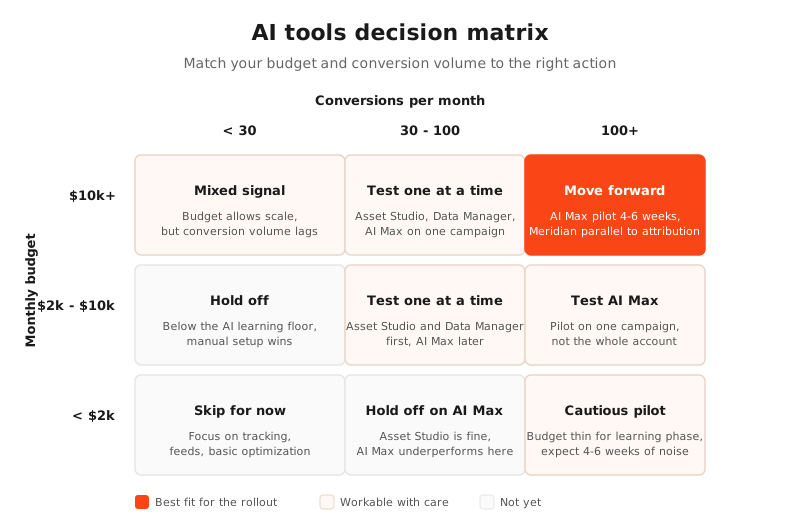
- Budget under $2,000 a month, fewer than 30 conversions. Don’t touch AI Max or AI pacing yet. Focus on tracking, feeds, basic optimization. AI tools start delivering when there’s scale to work with.
- Budget $2,000-10,000 a month, 30-100 conversions. Cautious testing of one AI tool at a time, not all at once. Asset Studio and Data Manager – now. AI Max – test on one campaign, not across the whole account.
- Budget $10,000+ and 100+ conversions. You can move more aggressively, but still in sequence and with controlled measurement. AI Max for Shopping as a 4-6 week pilot. Meridian running parallel to current attribution, not as a replacement.
The infographic below visualizes this matrix at a glance.
Which interest is being served here
A few things are worth naming without softening them.
Google wants you to adopt all of this immediately. That isn’t a conspiracy – it’s a business model. The more delegation to the algorithm, the more stable Google’s revenue, because AI optimizes not just against your goals but also against metrics that matter to the platform (impressions, reach, ad inventory utilization).
Your interest is different. You want advertising that pays for itself. Not “advertising that follows the trend,” not “advertising that uses the newest features” – advertising that brings money in. Those are different KPIs, and they often diverge.
The gap between these two interests isn’t catastrophic. It just isn’t something to ignore. What was announced at GML 2026 is genuinely a set of powerful tools. But they’re powerful for a specific client profile. If you’re in that profile, roll them out without delay. If you’re not, wait until the foundation is solid.
One takeaway will still hold a year from now, when these specific products have already changed. Google’s AI tools amplify what already works. They don’t fix what’s broken. If your tracking is off, your conversions are misdefined, your feed has errors – AI won’t fix that. It’ll accelerate the mistakes instead of accelerating the results.If you aren’t sure where your business sits on this spectrum, and which of the new tools are actually worth testing in your specific case – book an account audit, and we’ll start with measurement instead of implementation.
Subscribe to our newsletter