content
It would seem that the most convenient way to fill a product page is to take the manufacturer’s ready-made description, the one they wrote on their own site or emailed over in a press release. Copying it across 5,000 products in Google Sheets is easy enough, and by evening every product page is filled in. Product page SEO done before dinner, so to speak.
And best of all, you got there before your competitor. You’re already selling, while they’ve only just handed the job to their copywriter, who manages 3-4 unique texts in a full working day. So which of you won in search?
Most often, neither. The same text now sits on the manufacturer’s site, on a marketplace and on every store that also knows where Ctrl+V is. That’s why, when we get a store’s catalog found in search, our first question about product pages isn’t “is there a description?” but “how is this page different from a hundred identical ones?”
Below are 3 parts. First we’ll sort out which product pages are worth writing by hand and which aren’t. Then we’ll look at what Google counts as page content besides the text (spoiler, it’s a lot). Finally, we’ll follow a product page from the day it appears on the site to the day it’s taken off sale.
Manufacturer descriptions aren’t penalized
Let’s start with the reassuring part. Back in 2021, Google’s John Mueller said there’s no penalty for duplicate product descriptions, and nobody demotes a site for them. You can breathe out.
But not for long. When a generic query matches identical text on many pages, Google picks one of them and shows only that one. Like in Highlander, there can be only one.
A store can win that pick if it’s the best or the closest source of the product. But what makes your page better if its text is word for word the same as the manufacturer’s, the marketplace’s and a few dozen other stores’? The font, maybe.
Mueller, by the way, admitted that unique descriptions aren’t always realistic for a large catalog. So the task is to decide where unique text makes sense and where you can live without it.
Google doesn’t penalize a duplicate description. It simply picks one page out of all the identical ones, and not necessarily yours.
Rewrite 5,000 product pages?
We hear this question from every store with a large catalog. Let’s do the math. If a copywriter writes 4 texts a day, 5,000 product pages take 1,250 working days. That’s about 5 years, assuming 250 working days a year and a copywriter who never gets sick or takes a vacation. Some of those models will be discontinued by then, won’t they?
“Then we’ll hire 5 copywriters.” You can. It just won’t cut the time as much as you’d hope, because someone has to write their briefs, edit the texts and make sure the binoculars from one writer don’t turn into a “spotting scope” with another.
Meanwhile the company’s costs grow quite predictably. Back in 1975, Fred Brooks wrote in The Mythical Man-Month that bearing a child takes 9 months no matter how many women are assigned, and texts work much the same way.
So the catalog needs splitting. Hand-written work belongs on product pages that can bring in money from search. A catalog usually has few of them, and they’re easy to spot.
- People search for this exact model by name or SKU, not just for the category.
- The product has a high margin or is a bestseller.
- The page already ranks in positions 5-15 in Search Console. They say the best place to hide a dead body is page 2 of Google, but a product page at position 12 is still very much alive.
- It gets impressions but few clicks, so the snippet is losing to its neighbors.
| Group | Signs | What to do |
|---|---|---|
| Write by hand | Demand for the model, margin, positions 5-15 | Your own description, your own photos, answers to common questions |
| Template plus data | Demand for the category, not the model | Text built from specs and your store’s data |
| Leave as is | Products on their way out, no demand | Manufacturer description and full specs |
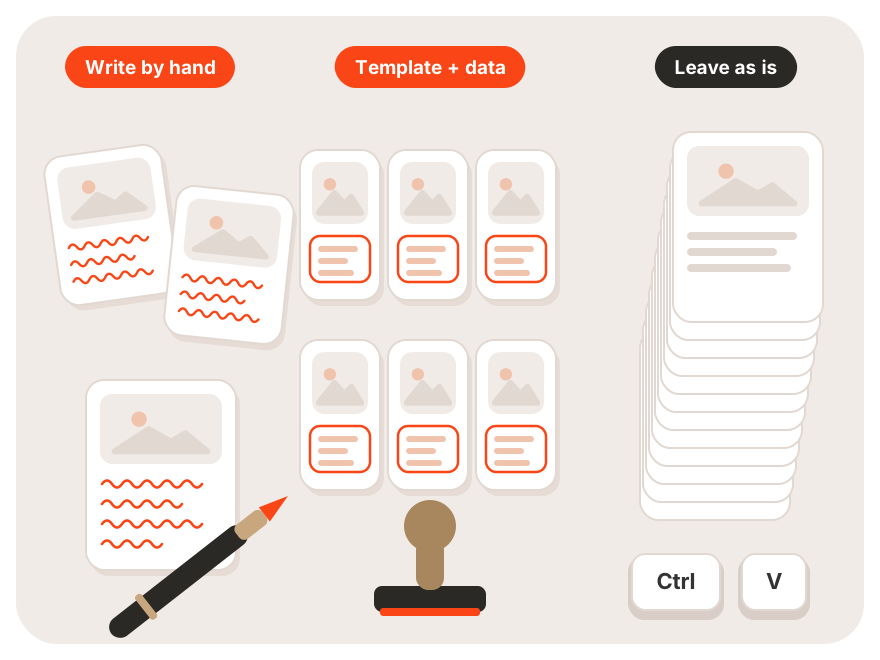
Not every product page deserves unique text. Start with the ones that are already close to page 1 or that people search for by model name.
A template Google won’t call lazy
For the middle group, your hand reaches for AI to generate 3,000 texts. Fast, cheap, and in every other one the binoculars become “the perfect choice for true nature lovers.” Sound familiar?
Google’s guide on helpful content describes exactly this scenario. Automatically generating pages from feeds or using generative AI to produce large amounts of text without manual oversight or curation, in Google’s words, “represents little to no effort.” Not a phrase you want anywhere near your catalog.
So a good template collects what the manufacturer’s description lacks. Compatibility with other products, what’s in the box, real dimensions, delivery terms and the warranty at your store specifically. In other words, data only you know. Adjectives are something every language model already has plenty of.
Someone should still read a share of those texts. Spot checks at least, because a template error gets copied onto thousands of pages at once. One missing space in a variable, and 2,000 pairs of binoculars suddenly come with a “12-monthwarranty.”
Text is the smallest part of the page
Now for the slightly unexpected part. In the same guide, Google explains what main content is. It’s any part of the page that directly helps the page achieve its purpose.
Google counts primary text and media, interactive features, customer reviews, information in tabs (such as product specifications or safety notes) and even page titles and headings as main content. The description is just 1 item out of 5. Isn’t it odd to spend the whole budget on it?
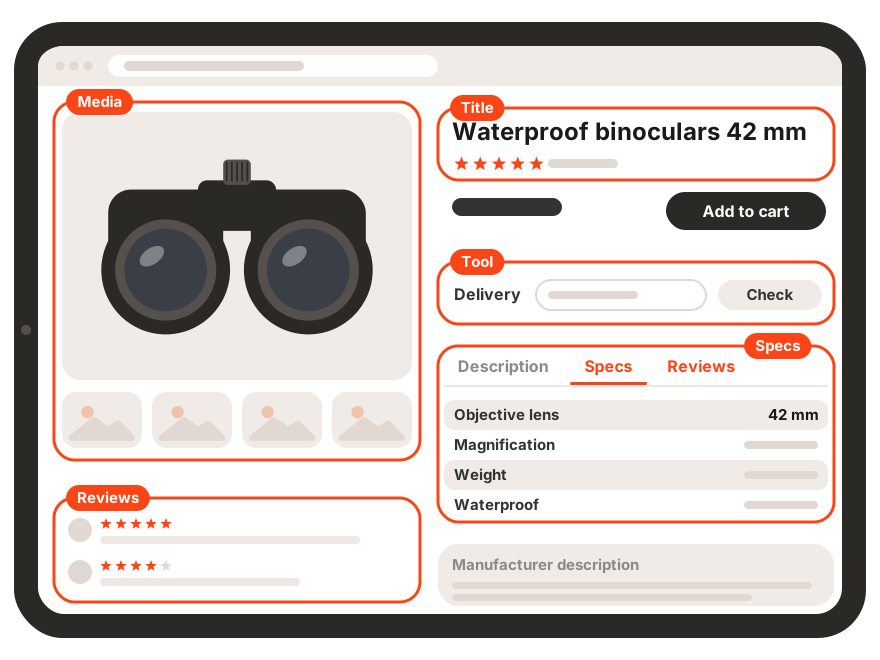
To Google, a product page is the title, photos, specs, reviews and tools together. The manufacturer’s description is only one of those parts.
A title people search for
Google counts the page title as main content too, since it sums up what’s on the page. Now remember what product names look like in a feed. “BX-1042 GR” sounds more like a droid from Star Wars than something a person would type into search.
A formula of brand, model and the attribute that sets the product apart from its neighbors works better. For binoculars that’s magnification and objective lens diameter, for clothing it’s color and material. What matters is that the attribute is something people really type into search, not something the purchasing department found important.
We described similar logic for categories in our category page template.
Specs in a tab count too
Remember when stores pulled specs out of tabs into a wall of text “so Google would definitely see them”? Google now states separately that information in tabs, including product specifications, belongs to main content. As the saying goes, it’s not a bug, it’s a feature.
There’s no need to turn the table into paragraphs. It matters more that the specs are complete and match the feed.
If the page says 42 mm and the feed says 40 mm, one of you is wrong, and the shopper will notice before Google does. Usually in a 1-star review. We covered how to keep the same data in the feed, the ads and the site in our article on one product language.
Shoppers write reviews, Google counts them
Google also counts customer reviews as main content when they directly fulfill the page’s purpose. For a product page with the manufacturer’s description, they’re often the only unique text on the page.
On top of that, shoppers write in the words they later search with. “Do they work with glasses,” “do they fog up in winter,” and sometimes “my wife says they cost too much, but the birds look amazing.” You won’t find phrases like these in a press release, although that last one, you’ll agree, sells better than half of all marketing copy.
Reviews sell, too, so treating them only as an SEO element is a waste. Where to place them, how to show the rating and what to do with negative ones (yes, those shouldn’t be hidden either) is decided together with conversion optimization of the product page.
Reviews give a product page unique text that no competitor has. Collect them as persistently as you collect orders.
Product markup for a store
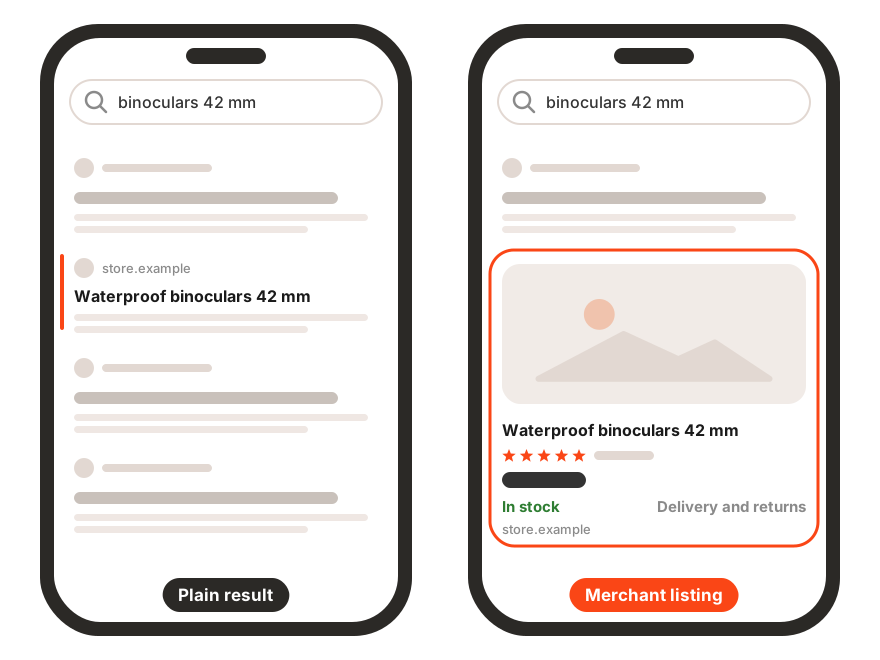
No jokes here, because markup doesn’t get jokes. Google distinguishes 2 kinds of product markup. Merchant listings are for pages where the product can be bought. Product snippets are for pages where it can’t, such as reviews.
Merchant listings are rich results with price, availability, shipping and returns that Google can show for online store pages. Markup makes a page eligible for them but doesn’t guarantee they’ll appear.
For a store’s product page, the required fields are the name, an image and an offer with a price above zero and a currency. The offer has to be an Offer, not an AggregateOffer, because you’re the seller. Recommended fields include GTIN, brand, availability, rating and reviews, plus shipping and returns, which Google suggests setting at the organization level.
If the product comes in colors or sizes, ProductGroup markup helps, and we covered it in our article on the ecommerce organic traffic drop.
A product page’s first 20 hours
So the page is live. When will Google see it? Google’s Gary Illyes gave typical timeframes at Search Central Live in Barcelona. The figures come from one attendee’s notes, not from official documentation, so treat them as a rough guide, not a promise.
In a typical case, Google discovers a new URL in about 20 hours, and in the worst case in weeks or never. “Never” isn’t artistic exaggeration here, it’s one of the answers, word for word. Google typically recrawls known pages every 30 days. Structured data changes get picked up in anywhere from a few hours to 1-2 weeks.
What does that mean for a product page? Google may keep showing a price error from your markup for a week after you fix it. And a product that’s only linked from page 40 of your pagination… Even the most stubborn shoppers rarely make it that far. A link from the category and an up-to-date sitemap matter more here than any description.
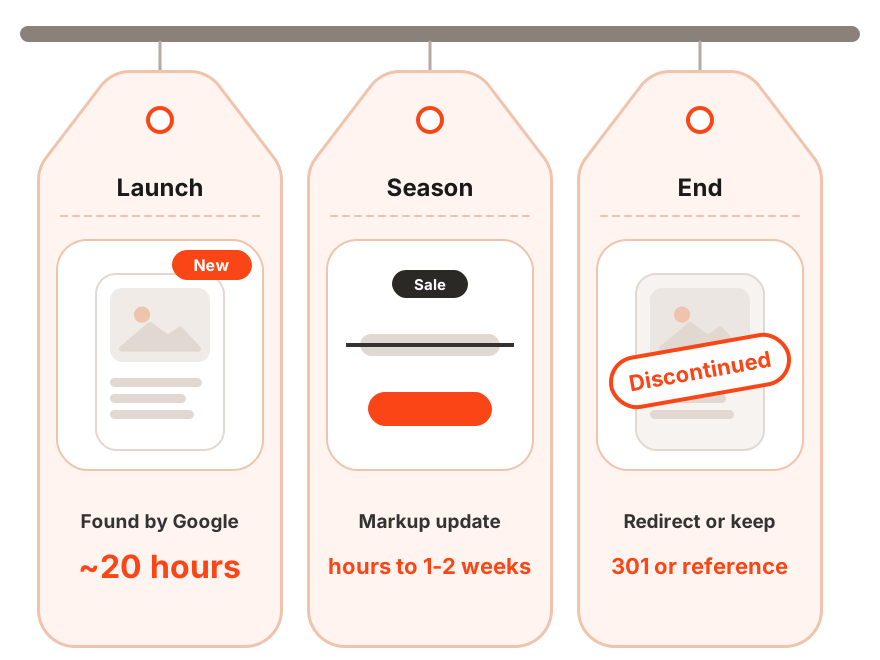
Prices and stock in peak season
Prices change most often during sales, and this is where a product page depends on the feed. Merchant Center warns that automatic item updates may not work for products whose price or availability changes more than once a day. Such a product may then be disapproved instead of updated. Right when you need it most, of course.
Google recommends that these stores send changes through the Merchant API. And one more detail people often forget. The price in the markup, on the page and in the feed has to match at every moment, even at 3 AM in the middle of a sale, when everyone who set it up is fast asleep.
The more often prices change, the more important it is that the page, the markup and the feed update together. A mismatch costs you impressions in both search and ads.
When a product disappears
Sooner or later every product page reaches the end. A temporarily sold-out model stays up marked OutOfStock, while a discontinued one gets redirected to its replacement or kept as a reference page. We went through all the scenarios in that same article on traffic drops, so we won’t repeat them here.
Product page checklist
- Decide whether the page belongs in the hand-written, template or “leave as is” group.
- Check that the title includes the brand, the model and the attribute people search for.
- Fill in the specs completely and check them against the feed.
- Give shoppers a simple way to leave a review.
- Add Product markup with price, currency, availability and GTIN.
- Make sure the category page links to the product page.
- Check how often prices change and whether the feed keeps up.
Product page SEO FAQ
Can you use the manufacturer’s product description?
Yes. According to John Mueller, there’s no penalty for duplicate descriptions. But among identical pages Google will show only one, so your important product pages need content of their own.
How many words should a product description have?
Google doesn’t name a minimum word count. What matters is whether the page helps people choose. Specs, photos, reviews and answers to common questions do more for that than an extra 300 words.
Does Google count text in tabs?
Yes. Google counts information in tabs, including product specifications and reviews, as part of a page’s main content.
Does every product page need Product markup?
It’s needed for a page to be eligible for product rich results with price and availability. Markup doesn’t guarantee they’ll appear. Google also takes product data from Merchant Center, so both sources should match.
Can you write product descriptions with AI?
Yes, as long as a person reviews the result. Google’s guide classifies mass-generated text without manual oversight as content that represents little to no effort.
Start with 50 product pages
You don’t need to rewrite the whole catalog, or wait 5 years. Take 50 product pages with the highest demand and positions closest to page 1, add specs, reviews and a proper title, and compare the results in 2-3 months.
Your competitor and their copywriter with 3-4 texts a day will get to those same pages sooner or later. If you want to be there first, talk to Advantrise, and we’ll help you pick the product pages worth starting with.
Subscribe to our newsletter