
content
Market sellers have known this trick for centuries.
The stall is open to everyone. But the moment a wholesale buyer or a regular walks past, the voice gets louder, the smile wider, the haggling more generous.
Nobody chases the casual passers-by away. The seller simply works harder for the attention of the person who matters.
LinkedIn targeting in Microsoft Ads runs on exactly that logic. Read its name as “show my ads only to directors” and it will drain your budget. Read it as “outbid everyone for the directors in the general queue” and it starts earning.
This is everything you need to know about the tool: the three LinkedIn dimensions, the bid-only mechanics, step-by-step setup with the real button names, starting bid adjustments, ABM patterns, and the limits better learned before launch than from the reports.
At Advantrise we layer this onto Microsoft Ads campaigns all the time, and the most common client request sounds the same every time. Show the ads to finance directors only, and to no one else. A fair wish, it is why people come to this channel at all. But the tool is built differently, and the gap between that expectation and the actual mechanics is where most budgets go missing. Some switch it on as a filter and are baffled that impressions run far beyond their list. Others never switch it on at all, because the interface has no familiar “audience” word to find.
Why the channel deserves budget in the first place, we covered in our look at Microsoft Ads as an underrated channel, and how to enter it properly, in the piece on importing from Google. This article closes the trilogy with the part the channel is actually famous for.
The three dimensions, and what each one really means
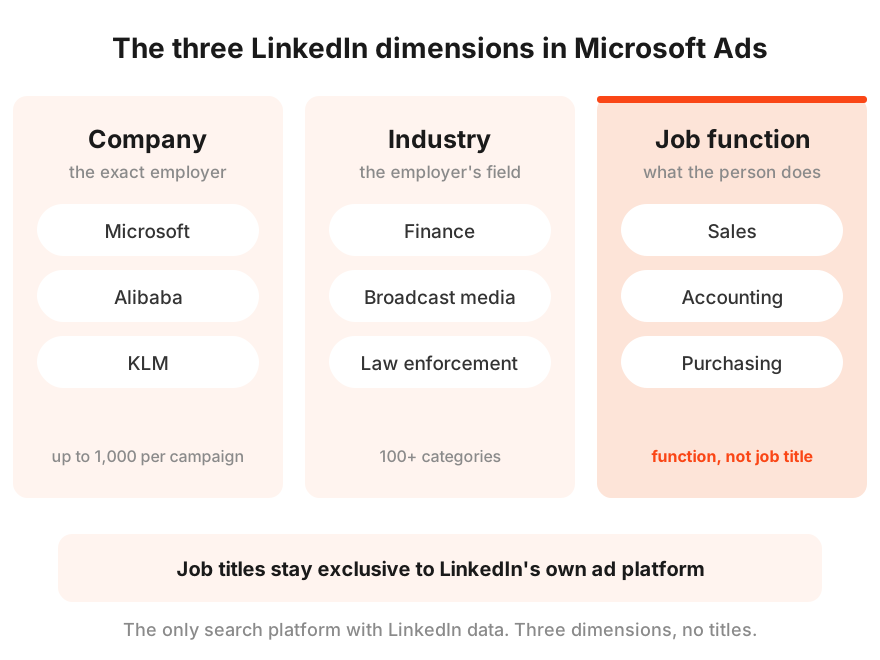
Microsoft Advertising is the only ad platform outside LinkedIn itself that lets you target by LinkedIn profile data. There are exactly three dimensions:
- Company. The specific employers people work for. Microsoft, Alibaba, KLM, anything in the platform’s directory.
- Industry. The employer’s field, from finance to law enforcement, more than a hundred categories.
- Job function. What the person does, sales, accounting, purchasing.
Job function is a line of work, not a job title. Microsoft Ads knows someone works in finance. It does not know they are the CFO. Title-level targeting stays exclusive to LinkedIn’s own ad platform.
That difference between function and title decides who the tool fits. If reaching the finance function inside a particular industry is enough, Microsoft gives you that at the price of a search click. If you need the CFO specifically and nobody else, that is a job for native LinkedIn, at a cost per click several times higher.
The directories, for what it is worth, are not bottomless. A niche company or an exotic function may simply not be listed yet, the catalogues grow gradually. When that happens you build the segment wider, from the industry, and that is a normal working situation rather than a dead end.
It is not a filter. It is paying extra for the right people
Now the main part, and the exact spot where most advertisers’ intuition breaks.
LinkedIn targeting in Microsoft Ads does not narrow your audience. By targeting a company you are not excluding everyone who works elsewhere. Microsoft’s own documentation suggests thinking of it as “bid only”, as opposed to the “target and bid” you know from remarketing lists.
Think back to the seller at the top of this article. He does not shut the stall to casual passers-by, he calls out louder when the wholesale buyer appears. Same mechanics here. Your keywords keep working on the full search demand, and when a query comes from someone whose profile matches your dimension, the bid adjustment you set kicks in. A plus thirty percent on the finance function means you are willing to pay a third more for a finance person’s click than for the very same query from anyone else.
Bid only means the segment affects the bid, never the right to be shown. Everyone searching your keywords sees the ads. The segment only decides who you fight harder for.
Two things follow from this, and both are worth accepting before launch. Keywords stay the backbone of the campaign, because the layer amplifies search intent rather than replacing it, and no adjustment will rescue weak keyword work. And there will be plenty of impressions outside your segment, which is not a malfunction. You pay no premium for them, they live on the base bid, so a report where half the clicks sit outside the target segment is no reason to panic. What matters is different, what a click and a conversion cost inside the segment against outside it.
One more small print item people forget. The layer only sees people Microsoft could match to LinkedIn data. Anyone not signed in to the ecosystem, or without a profile, is just another passer-by on the base bid.
Where it shows and where it does not
The layer is available for Search campaigns, Dynamic Search Ads, Microsoft Shopping, Audience campaigns, and Performance Max. PMax is the trickier one for now, it is not open to every account yet, and the setup there lives in audience signals rather than campaign targets.
And let me clear up the most common misunderstanding right away. This is not buying LinkedIn ad inventory. Your ads live where they lived, in Bing search, across the network and partner placements. LinkedIn is only the source of knowledge about the person, never the venue.
Availability also varies by market, so before planning it is worth checking the country list in the help pages and your own interface. The Demographics tab, for one, has not reached every account yet.
Step-by-step setup
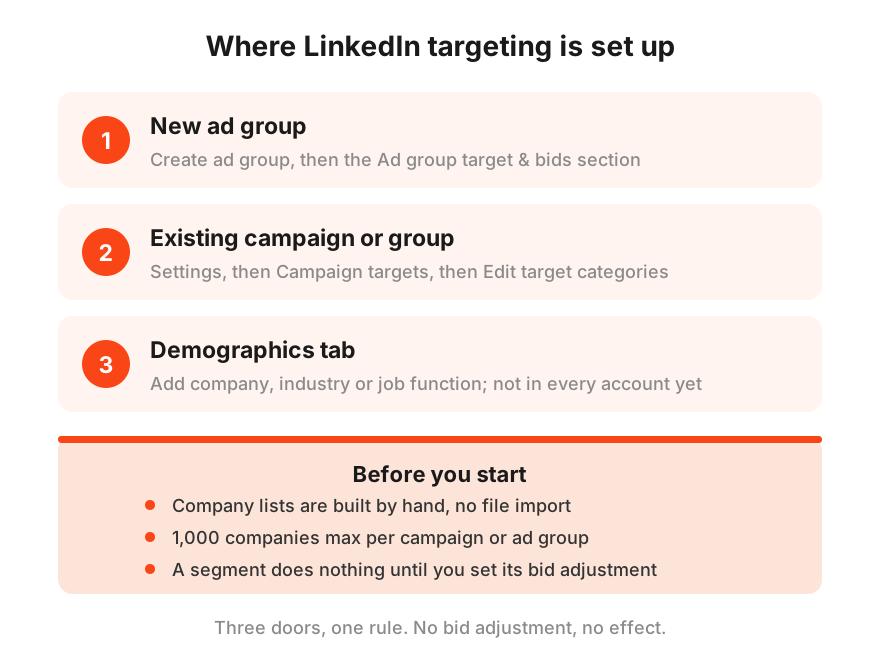
Now hands on. LinkedIn targeting enters the interface through three doors, take whichever matches your situation.
Door one, while creating an ad group.
One. Select Create ad group and get to the Ad group target & bids section.
Two. Select Company, Industry and/or Job function.
Three. If this target type is already set at the campaign level, you will see the Use my campaign settings toggle switched on. To set your own values for the group, switch it off and select Edit target.
Four. Search or browse the directory for the companies, industries or functions you need and select Target next to each. Finish with Done for every type.
Five. Set a bid adjustment for each target. Without one the segment does nothing, this is the same bid only we walked through above.
Door two, in an existing campaign’s or ad group’s settings.
In Settings, find the Campaign targets or Ad group targets section and select Edit target categories. From there the same steps. Dimension type, values via Target, Done, bid adjustment.
Door three, the Demographics tab.
If your account already has it, this is the fastest route for existing campaigns. Select Company, Industry or Job function, then Add company, Add industry or Add job function, find the values, set the adjustments, save.
The limits to know before you start.
Company lists are built by hand inside the platform. There is no import from files, a CRM, or other ad systems, so a list of several hundred accounts means several hundred manual additions, put the kettle on. The ceiling is one thousand companies per campaign or ad group, longer ABM lists get split across several campaigns.
Editing and exclusions.
Everything is managed from Demographics. The path runs Campaigns, the campaign you need, Demographics, the dimension type, the Campaign tab, checkboxes next to the targets, Edit. Four actions live there, Enable, Exclude, Delete, Change bid adjustment.
Exclude is the underrated one. It removes segments you have no wish to pay even base attention for. Your own company, so employees stop eating the budget with work searches. Or competitors who monitor your ads.
Bid strategy and combining dimensions
Setting it up is the easy part. The harder part is not wrecking the campaign’s maths with the adjustments, so a few rules from our practice.
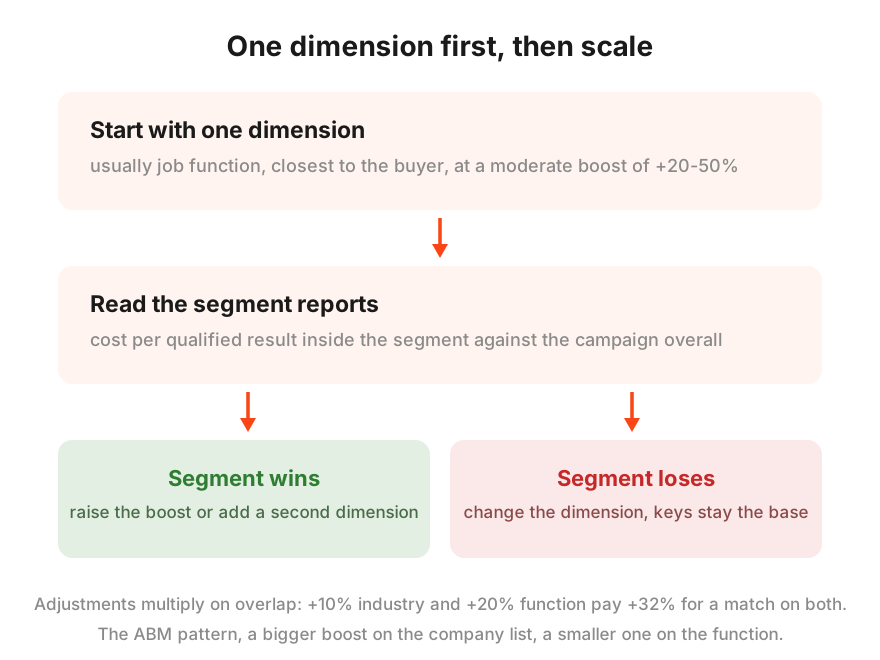
Start with one dimension, not three. Every added dimension multiplies the complexity of reading the reports and quietly compounds the price of the overlap, and at the start you need a clean answer to a single question, does the target segment convert better than the rest of the traffic. Job function usually goes first, it sits closest to the buyer portrait.
Keep the opening adjustment moderate. In our practice a working start is plus twenty to fifty percent on the dimension that matters most, and the number then grows or shrinks with the data. Maxing it out on day one means overpaying for a hypothesis nobody has tested.
Combine dimensions carefully, because the adjustments multiply where they overlap. Target an industry at plus ten percent and a function at plus twenty, and a person matching both gets plus thirty-two, since one point one times one point two makes one point three two. Microsoft’s documentation spells out exactly this example. Stack three generous boosts and the overlap quietly pays double without you ever deciding to. The working ABM pattern respects that maths. A noticeable boost on the target company list, a smaller one on the function, and a period of watching until the data says where to push next.
Make decisions from the segment reports, not from a feeling. The same Demographics tab where you just set the targets shows impressions, clicks and conversions for every dimension separately. Compare the cost of a qualified result inside the segment against the campaign overall, and from there either raise the adjustment or change the dimension.
And do not rush into automated strategies. Smart bidding inside your LinkedIn constraints works, but it needs conversion history. Until that history exists, manual control of the adjustments tells you far more precisely who you are paying extra for.
Where the tool ends
To keep expectations sober, the limits in one place, no decoration.
The layer sees only people matched to a LinkedIn profile, the rest of the traffic is anonymous to it. Titles it does not know, we covered that line back in the first section, so a CFO and a junior accountant in the same function look identical, and if that difference is critical, native LinkedIn remains the only option at its own cost per click. The directories are incomplete, a niche company or function may be missing, and then the segment gets built from the industry up. And company lists are manual work with a thousand-per-campaign ceiling.
Most of all, it does not rescue a weak campaign. Without working keywords, clean conversion tracking and decent ads, the LinkedIn layer only makes the non-converting impressions more expensive. It is an amplifier, never the foundation.
LinkedIn targeting in Microsoft Ads FAQ
Can I show ads only to selected companies and no one else?
No. LinkedIn targeting works as bid only, it raises your bid for people in the segment but never switches the ads off for everyone else. Anyone searching your keywords sees them. Hard narrowing down to the segment is not what this tool does.
How is this different from advertising on LinkedIn itself?
Venue, precision, and price. Here your ads live in Bing search and the Microsoft network, LinkedIn only supplies the data about the person. Native LinkedIn knows exact job titles and shows ads inside its own feed, but a click there costs several times more. Microsoft gives you the professional dimension at search-click prices, at the cost of less precision.
How many companies can I target?
Up to one thousand per campaign or ad group. Lists are built by hand inside the platform, importing from external files or other systems is not supported. Longer ABM lists get split across several campaigns.
What bid adjustment should I start with?
A moderate one, in our practice plus twenty to fifty percent on the dimension that matters most. The number then grows or shrinks with the segment report data. Maximum adjustments on day one mean overpaying for an untested hypothesis.
Does LinkedIn targeting work in Performance Max?
Yes, with two caveats. It is not open to every account yet, and the setup runs through audience signals rather than campaign targets. For Search, Dynamic Search, Shopping and Audience campaigns the layer sits in the regular targeting interface.
What to do with this
LinkedIn targeting in Microsoft Ads is the shortest route to a professional audience dimension at the price of a search click, and the only one of its kind in search advertising. But it works like the seller from the top of this article, calling out louder to the right people, not like a doorman admitting by list only. Keywords bring the demand, clean tracking counts the results, and the layer pays extra for the people whose profile matches the buyer. Inside that chain it earns. Outside it, it only spends.
That closes our Microsoft Ads trilogy. Why the channel, how to enter it, and how to use its signature advantage. If after three articles the honest feeling is that none of this will reach the top of your list any time soon, Advantrise assembles this exact chain regularly, keywords, tracking, the LinkedIn layer and segment report reading in one piece. A channel with cheaper clicks and professional targeting still belongs to the few who entered it properly, and the queue is not long yet.
Subscribe to our newsletter