
content
The most confusing Microsoft Ads account we ever untangled was set up flawlessly. For Google.
A logistics software company wrote to us a week before they planned to switch the channel off. They had imported their Google Ads campaigns a month earlier, the budget had gone out, and conversions sat at zero. They asked us to look at their Microsoft Ads one last time, mostly to close the question for good.
We opened the account and found nothing suspicious. Clean structure, ad groups organised sensibly, relevant keywords, ads written by someone who knew the product. It looked like a working campaign because it was one. Just not for this platform.
The UET tag was missing from the site. For a month the campaigns had run blind, and a smart bidding strategy had spent that month optimising toward conversions the system could not see. That zero in the report was not a result. It was an empty space where the data should have been.
That should have been the end of it. We installed the tag, defined the conversions, lowered the bids for a cheaper auction, reset the device adjustments, and called it a day.
By the next morning half of those changes had rolled back.
The import had left a sync schedule with Google switched on. Every night it politely restored the account to its Google state. Bids, budgets, campaign statuses. We fixed the account by day, and it turned back into a copy by night.
After that one, we stopped treating import as a quick way to move campaigns across. It does not move a campaign. It hands you a specific list of things to repair, and in our work that list runs to six items.
First, a word on why this channel deserves budget at all. We covered who Microsoft Ads makes money for and how separately. Cheaper clicks, a wealthier business audience, and targeting built on LinkedIn data that no other search channel offers. This article is about the next step, getting in without losing the thing you came for.
The door is called the import tool. Microsoft made the move from Google deliberately painless, because for most advertisers it is the only realistic way to try the channel without weeks of manual setup. The tool does what it promises and moves your structure. The trouble starts when an advertiser reads that as moving the campaign.
There are three sensible positions to take on import.
The first is to skip it and build the account natively. Cleanest route, every setting chosen on purpose, and slow. For an account with a handful of campaigns that purity costs more than it returns. It earns its keep when the Google structure is dated anyway and you have no wish to drag it anywhere.
The second is to import once, kill the sync immediately, and rework what landed. This is the practical route for most advertisers, and the rest of this article follows it.
The third is to keep the sync running so the Microsoft account lives as a mirror of Google. Workable, but only when Google is your single source of truth and you have accepted what a mirror cannot do. The main limitation is below, and it stings.
Here is what breaks in a one-to-one move:
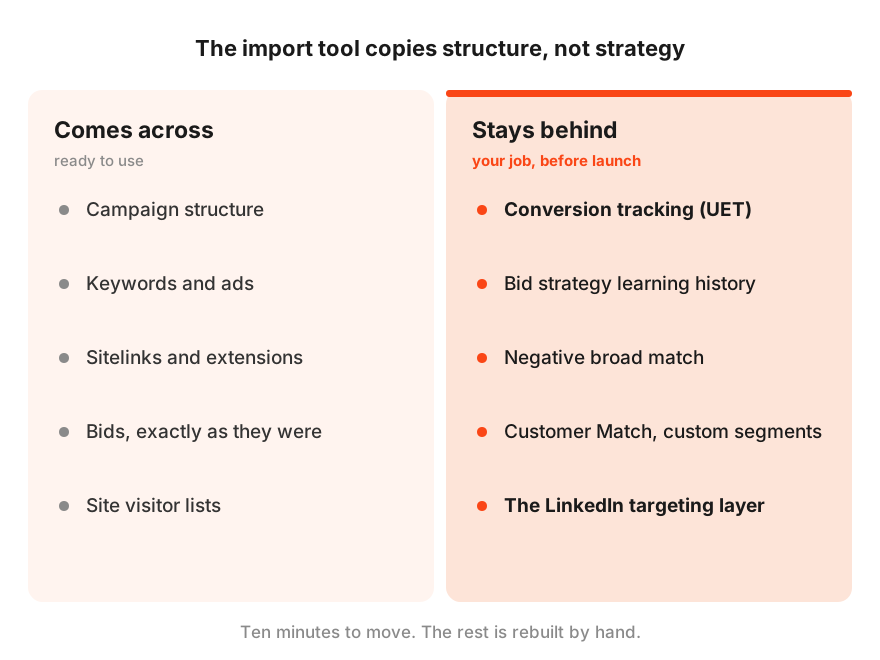
- Conversion tracking does not come with the campaigns. The account starts blind.
- A sync schedule can undo your edits overnight.
- Bids and adjustments still follow Google logic, in an auction that works differently.
- Matching runs wider on Microsoft while your imported negatives cover less.
- Geography, time zones, and partner networks shift without asking.
- The one thing that makes this channel worth using is not in the box.
Six items, one at a time, with what each one costs and how to fix it.
Conversion tracking does not come along
The first problem is also the most expensive. Google conversion tracking has no connection to Microsoft. Google conversions live on Google’s pixel, Microsoft counts through its own UET tag, and there is no bridge between them. The import moves your campaigns without moving your ability to see results.
UET (Universal Event Tracking) is the Microsoft Advertising pixel. It goes on the site separately from any Google tag, and without it Microsoft sees no conversions at all, however many actually happen.
Nothing here looks like a failure, which is what makes it expensive. Campaigns run, clicks arrive, and the interface reports zero conversions. Some advertisers shut the channel down at this point with a verdict that it does not work. Others do worse and start moving bids in response to a zero that was never real. Both decisions rest on data that does not exist.
In our work this is the single most common reason a Microsoft account looks dead after an import. Not the auction, not the audience. Nobody installed UET or mapped the conversions before launch. The order here is strict. Tag and goals first, live campaigns second, never the other way round.
The sync schedule overwrites your work
This is the sneakiest item on the list, because it does not hit on day one. It hits after you have already fixed everything.
During import the tool offers a sync schedule with Google, from one-off to daily, and plenty of people leave it on without a second thought. Microsoft documentation states the consequence plainly. Any updates you make to imported campaigns, including status, bids, and budget, may be overwritten the next time the import runs.
So you lower bids for the cheaper auction, and the overnight sync restores the Google bids. You pause a campaign, the sync sees it running in Google, and switches it back on. The Google budget usually rides along with the status, and it tends to be larger than whatever you set for a test.
The sync schedule lives separately from your campaigns, under Import, then Import schedule and history. Pausing a campaign in the interface does not stop it. It is an independent process that keeps running on its own timetable until you pause or delete it explicitly.
Microsoft’s own forums carry plenty of these stories, including cases this year where an auto-import reactivated paused campaigns across several billing cycles and pulled Google budgets with them, producing invoices nobody had planned. So on the “import once and rework” route, the very first action after the move, before any edits, is to pause or delete that schedule. Otherwise every fix you make lives until the next sync.
Your bids still think they are on Google
Everything that touches cost per click arrives in the shape that was winning on Google. In Microsoft that shape underperforms, for three reasons at once.
Raw bids sit too high. Microsoft CPCs run lower across most commercial categories, and in B2B and SaaS the gap is often wide. Bids carried over untouched mean overpaying in an auction where the same position costs less. The money does not vanish anywhere dramatic. It just leaks from day one.
Device and audience bid adjustments transfer, but their reasoning stayed behind in Google. Here is the classic version. A Google campaign held reduced bids on desktop because its audience was mobile-first. That same negative multiplier lands in a channel where desktop work traffic is the main prize, and quietly trims the best part of it. These multipliers carry no predictive value on Microsoft. Reset them to zero and rebuild on Microsoft’s own data.
Smart bidding strategies arrive without the one thing that made them work, their learning history. A Target CPA that leaned on months of Google conversions starts from a blank page here, and some strategies get converted to Maximise Clicks during import. Combine that with the empty tracking from the previous section and you get double blindness. A strategy with no history, learning from conversions the system cannot even see.
That account from the top of this article managed both at once. The Target CPA it brought from Google spent weeks hunting conversions in a system that could not register them, so bids drifted and budget drained into the broadest queries. Once the tracking was clean and the adjustments were reset, the same account settled at a cost per lead below Google. The first few weeks simply paid for the lesson.
Matching widens while your negatives shrink
Two halves of one problem, and together they open a road straight into junk queries.
First half. Match types on Microsoft behave more generously than a Google-trained instinct expects. Close variants here include queries with the same intent, not only misspellings and plurals, and that applies to exact match too. Add bid inheritance, where a narrower match type inherits its bid from a broader one if you did not set bids for all of them. The imported keyword list ends up catching noticeably wider traffic than the same list caught on Google.
Second half. The negative keywords meant to filter that traffic cover less after the move. Microsoft has no negative broad match. Negatives come in phrase and exact only.
Negative broad match in Google blocks a query containing all the words of the negative in any order. Microsoft has no such type, so a negative fires only as a phrase or on an exact match. A negative list built in Google on broad negatives physically cannot block what it blocked at home.
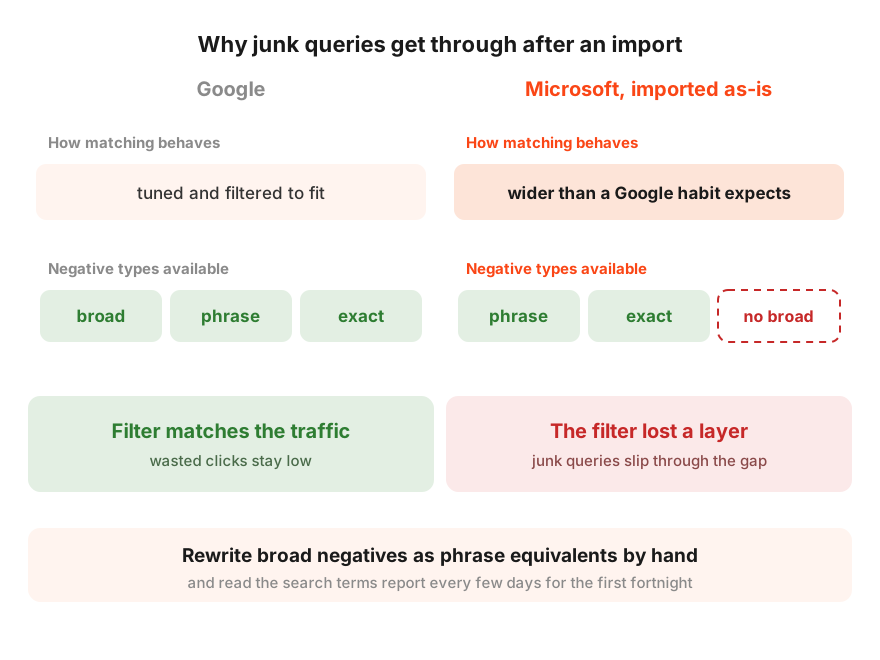
Put the halves together. Matching got wider, the net got thinner, and all of this runs on a network where partner placements mix into search. For the first few weeks after an import, treat the search terms report as the main document in the account rather than routine housekeeping, and rewrite those broad negatives into phrase equivalents by hand.
Geo, time, and partners shift underneath you
A cluster of smaller shifts. Each looks minor on its own, and together they change who sees your ads, where, and when.
Geography can widen without your consent. If a Google campaign targeted a city Microsoft does not support, the import automatically expands the target to the parent region or state. A campaign built for Munich alone can arrive as all of Bavaria, and nobody asks first.
Import Summary is the report Microsoft produces after every import. Its warnings show which locations were mapped to broader parents, what was skipped, and what was changed. Read it fully rather than closing it.
Campaign time zones can shift during the move, which sends an ad schedule built around business hours off to live on someone else’s clock. Search partners and the Microsoft Audience Network usually arrive switched on by default, so part of the budget starts flowing to MSN, Outlook, and partner sites, where quality varies a great deal. None of that is automatically bad. It should be a decision you made, not a default you missed.
The best part is not in the box
The final item is what separates having imported from having launched.
Audiences transfer partially. Website visitor lists convert into Microsoft remarketing lists, which is welcome. Customer Match and custom segments do not come across and need rebuilding natively. The nastiest gap is exclusions. If your Google campaign excluded existing customers through an uploaded list, that exclusion may simply not exist after the import, and your ads start showing to people who already bought.
And the channel’s signature tool is absent by definition. Targeting on LinkedIn data, by industry, company, and job function, has no Google equivalent, so there is nothing to transfer. You add it manually, layered over the search campaigns, and for B2B it is what turns Microsoft from a cheaper Google into a channel with its own edge. An import without that layer keeps the Google structure and loses the reason you came.
What to fix and what to rebuild
The six items differ in weight and in what they cost to repair. Three groups make it easier to plan.
Fixable within the hour, inside the campaigns you already have. Pause the sync schedule. Reset device and audience adjustments to zero. Bring raw bids down for the cheaper auction. Make a deliberate call on search partners and the Audience Network. Check geo and time zones against the Import Summary.
Needs time rather than rework. Learning history for bid strategies and a stock of conversions. Nothing to rebuild here. Strategies need weeks and enough conversions to learn from, and until then manual bids or simple conversion optimisation are the safer hold.
Structural decisions. UET and a conversion map, if they were not in place before launch. Rebuilding the audiences the import did not carry, exclusions first. The LinkedIn layer over your search campaigns. These are not tweaks. This is the part where the account finally becomes native instead of a mirror.
Sitelinks and most extensions, for what it is worth, come across fine. Leave them alone beyond checking that nothing dropped.
The first 48 hours after import
This is the order we work through on every account like this. The sequence matters, because the early steps protect the later ones.
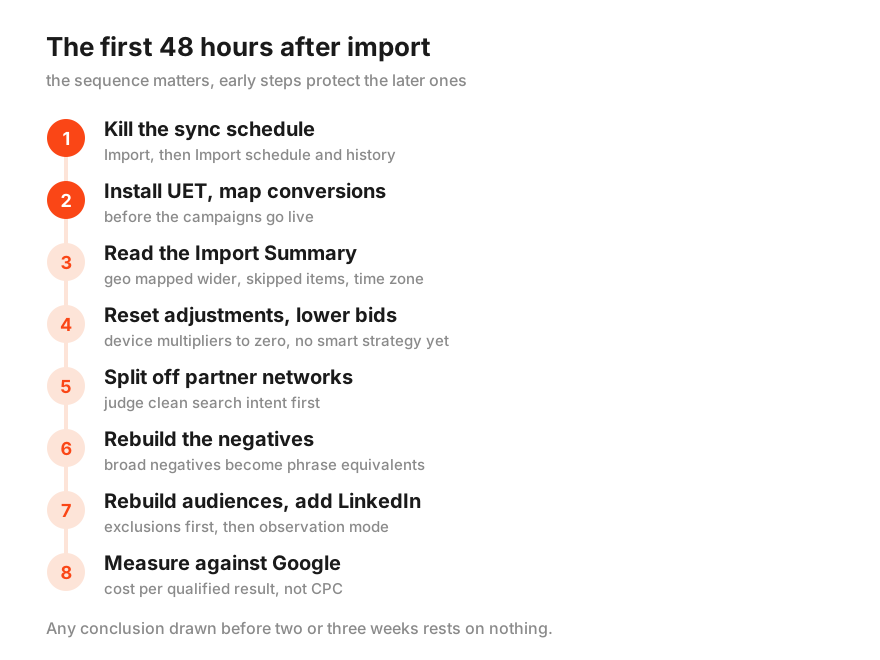
One. Go to Import, then Import schedule and history, and pause or delete the sync schedule. Until that is done, every other edit is temporary.
Two. Install the UET tag and map your conversions while the campaigns are still off. Mark the qualified outcome as the conversion, a confirmed enquiry or a purchase, rather than a button click. If the campaigns already ran, do not lean on their statistics. Until this point they were empty.
Three. Open the Import Summary and read the warnings. Locations mapped to broader parents, skipped items, converted bid strategies. Bring the geo back to what you meant and check the time zone against your ad schedule.
Four. Reset device and audience bid adjustments to zero and lower the base bids. Start noticeably below your Google bids and let the auction show you where to add. Do not switch on a smart strategy with no history behind it. Let the account gather conversions first.
Five. Turn off search partners and the Audience Network, or split them out, so the first weeks show you clean search intent. You can always expand back later, with data in hand.
Six. Rebuild the negative lists. Rewrite Google broad negatives as phrase equivalents, and for the first fortnight review the search terms report every few days, feeding new negatives from it.
Seven. Rebuild the missing audiences, starting with exclusions for existing customers. Then add LinkedIn targeting by industry or job function in observation mode, so you collect data without cutting reach.
Eight. Run Google and Microsoft in parallel and resist comparing them on CPC. Compare cost per qualified result, once both channels have clean tracking. Any conclusion drawn before two or three weeks rests on nothing.
Microsoft Ads import FAQ
Does conversion tracking transfer with the campaigns?
No. Google conversions live on Google infrastructure and have no link to Microsoft. Microsoft needs its own UET tag and its own conversion map, both set up before the campaigns go live. Without them an imported account reports zero conversions regardless of what actually happened.
Should you switch on automatic sync with Google?
For most advertisers, no. The sync schedule overwrites campaign status, bids, and budget on every run, which rolls back the very changes you made for Microsoft. It earns its place only as a deliberate choice to keep the account as a Google mirror, accepting that you cannot then optimise it separately.
Why is my CPC higher after the import than expected?
Usually because the bids came over from Google untouched. The Microsoft auction is cheaper, and raw Google bids in it mean overpaying for positions available for less. Lower the base bids, reset device adjustments to zero, and give the auction a few days to show you the real level.
Do negative keywords work the same way as in Google?
No. Microsoft has no negative broad match, only phrase and exact. A negative list built in Google on broad negatives covers fewer queries after the import than it did at home, while matching on Microsoft reaches wider. Broad negatives need rewriting as phrase equivalents by hand.
Would building the account from scratch be simpler?
For small accounts with a few campaigns, yes. A native build gives you a clean start with no inherited settings. For larger structures the import stays a sensible starting point and saves days of mechanical work. What matters is not how the campaigns arrive, but that the account gets reworked for Microsoft afterwards instead of staying a copy of Google.
What to do with this
Import is a perfectly normal door into Microsoft Ads, and there is nothing wrong with using it. The mistake is standing in the doorway. The tool moves your structure in ten minutes, while tracking, bids, negatives, audiences, and the channel’s main advantage stay your job, and that job is what separates a launched channel from a switched-on copy.
Most accounts we see after a self-serve import stopped at exactly that point. Campaigns copied, sync still running, no UET, and a verdict on the channel drawn from data that was never there. Advantrise usually arrives at this moment, with a list of what the import broke on the way in and the order in which it gets repaired. The longer a copy runs without that rework, the more budget goes into teaching someone else’s logic, and the more convincing the wrong conclusion looks.
Subscribe to our newsletter