
content
The word “audit” comes from the Latin audire, to hear. Accounts used to be checked orally, and the auditor literally listened for the figures that didn’t add up. Slow, but at least the auditor probably knew whose books they were checking.
An SEO audit usually skips this step.
A crawler listens to no one. It scans everything it can reach and counts. That’s why a typical report holds hundreds of items about code and not a single question about which products make you money, even though that question is where proper ecommerce SEO starts. Below we’ll take a report like that apart layer by layer, and each layer will filter out some of the items.
What’s left at the end is what’s worth paying for.
How agencies run an SEO audit
Client confidentiality means we can’t share client data. Not roughly, not with names changed, not with the niche swapped, not even in a whisper at the work Christmas party after the third glass.
So let’s take a hypothetical birdwatching store with 8,000 pages of binoculars, spotting scopes, feeders and birdseed. If one of our clients happens to be a binoculars store, we’ll tell them this isn’t about them. Our store’s traffic has slipped over the past 6 months, and the owner decides to commission an audit. Depending on where they go, they’ll get one of several very different documents.
The free report. It’s often handed out as a “gift” before selling a service. The site is run through a crawler, often a free one, and the free version of Screaming Frog stops at 500 URLs. On an 8,000-page store, that audit sees only about 1/16 of the site, and mostly the part closest to the homepage. The rest of the site simply doesn’t exist for it.
The template export. A paid version of the same thing, except the crawler covers the whole site. The export goes into a template with the agency’s logo, plus screenshots from the tool, a cover with a big health score and the verdict “312 issues found”, all spread over a 60-80 page PDF.
The 100-point checklist. Ticks next to title, sitemap and HTTPS. The checklist is the same for every site, so the conclusions are the same too.
The showcase audit. The craftiest one. Every issue it finds leads to a package of the same agency’s services, from “you urgently need 50 links a month” to “you urgently need 20 articles”, so the conclusion is known before the work starts. The audit itself can even be decent.
The audit with access. Before starting, they ask you to grant access to Search Console and analytics, and they ask about margins, seasonality and what sells best. The report names the pages that bring you money, and the items are ranked by importance instead of by icon colour. This kind of audit takes longer and costs more.
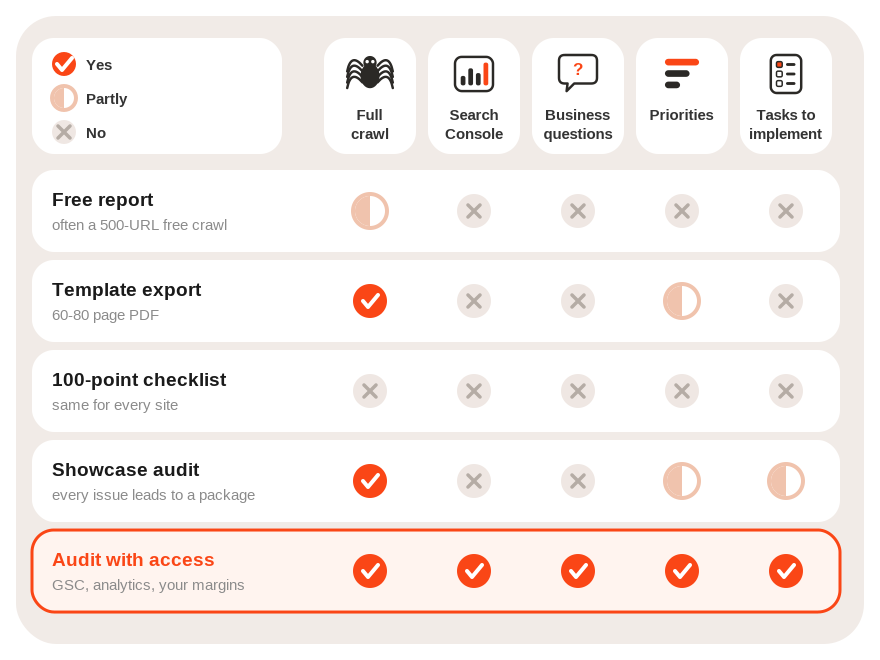
Recommendations in the first 3 types travel from report to report almost unchanged, from “add more content” to “build more links” and “fix every error on the list”, and they fit a binoculars store, a dental clinic and a soup recipe blog equally well.
Sometimes the previous client’s name is still in the text.
An audit often turns out to be a crawler export in one wrapping or another. The export itself is fine. It just measures what’s easy to count and knows nothing about your business.
The first thing the owner sees in a report like this is the number on the cover. Let’s start there.
Health score 94%, traffic falling
The tool gave our binoculars store 94%. Top-of-the-class marks, while traffic has been falling for 6 months.
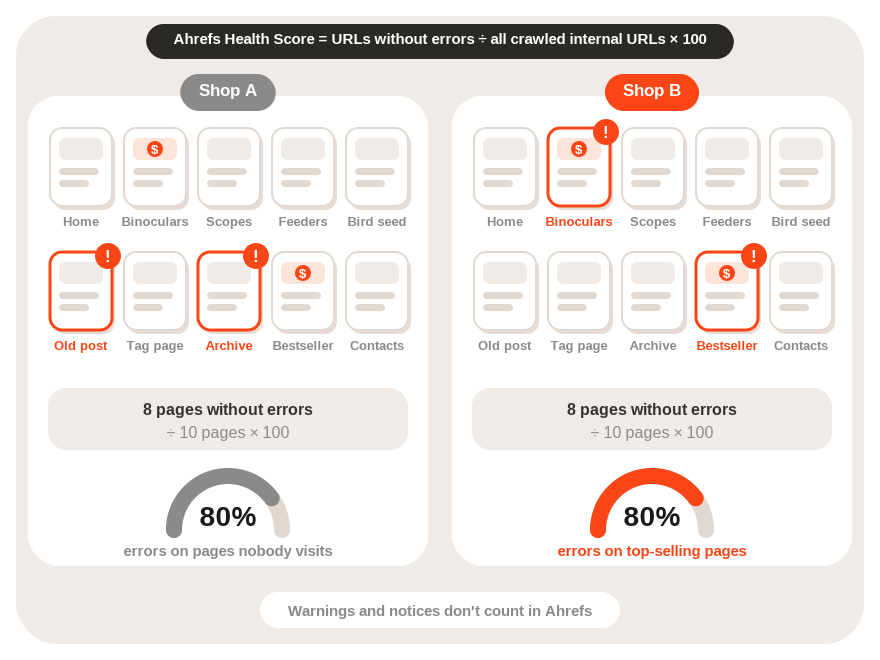
The reason lies in how that number is calculated. In Ahrefs, Health Score is the share of crawled internal URLs with no error-level issues, and warnings and notices don’t affect it at all. Semrush doesn’t publish a full formula for Site Health. According to its documentation, the score depends on the number of errors and warnings, with errors weighing more.
Traffic, demand and sales aren’t part of these calculations, and neither the Ahrefs nor the Semrush documentation mentions them.
On top of that, every tool counts in its own way. 94% in one and 71% in another can describe the same site on the same day, and comparing them is a bit like comparing marks from different schools on different scales.
Does that mean you can ignore the score completely? Not quite. Some of the errors behind it are serious. A noindex tag, broken internal links, canonical conflicts or a robots.txt block can all get in the way of crawling and indexing. The problem is that in the overall number, a noindex on a key category weighs the same as any other error on a page nobody searches for. Finding it among 312 items is about as easy as finding your binoculars in the dark.
On rankings, Google has been unambiguous about these scores. In 2023 John Mueller said “No, Google does not use scores from third-party SEO tools or services”. And in 2025 Martin Splitt added a plea worth printing out and sticking next to your monitor, “Please, please don’t follow your tools blindly”.
A health score shows how many technical issues a crawler found. It doesn’t show demand, rankings or sales, and a high score doesn’t guarantee traffic.
If the number itself says little, the next step is to look at what it’s made of. And the first bit of news is good, because some items can be crossed out without even opening them.
Errors Google doesn’t count
From a typical report, you can safely set aside the items Google itself has called non-issues or non-ranking factors.
- Text-to-HTML ratio.
- Meta keywords.
- Word count.
- Keyword density.
- 404 errors on removed pages.
- Number of H1s and heading order.
- “Toxic” links.
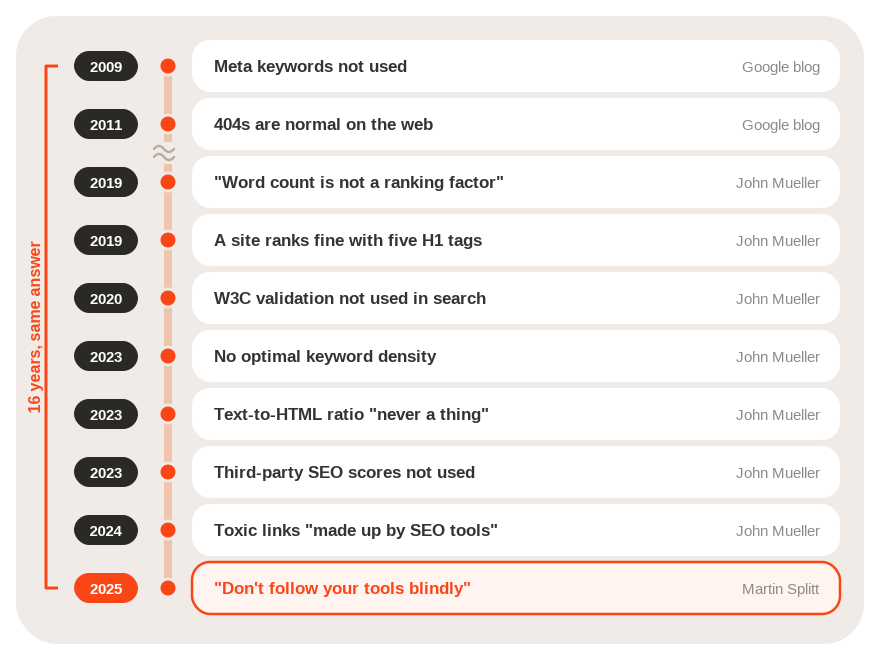
Now briefly, one by one.
Text-to-HTML ratio. A favourite of old-school audits. Mueller’s 2023 verdict on it leaves nothing to add. “It makes absolutely no sense at all for SEO. Zero. Nada. Zilch. It was never a thing.”
Meta keywords. Google’s documentation says this tag is “not used by Google Search, and it has no effect on indexing and ranking at all”. It has outlived several generations of SEO specialists, but Google doesn’t care whether it’s filled in or empty.
Word count. Stores are often told to “bring the description up to 1,000 words”. Google’s SEO Starter Guide has a lovely line on this. There’s no magic word count, no minimum and no maximum, “though you probably want to have at least one word”.
Keyword density. In 2023 Mueller said Google has no notion of optimal keyword density, and what matters is that a page says clearly what it’s about. Repeat the keyword endlessly and you get keyword stuffing, which breaks Google’s spam policies.
404 errors. Search Console help says “404s don’t harm your site’s indexing or ranking”. If a product has been discontinued and there’s no replacement, a 404 is a perfectly valid response.
There are 2 exceptions. If your own internal links still point to the removed page or it’s still in the sitemap, clean those up. And if valuable external links pointed to it and there’s a genuinely close replacement, a 301 makes sense. Redirecting everything to the homepage is a bad idea, as Google may treat that kind of redirect as a soft 404.
Number of H1s. Two H1s on a page often light up red. Google’s SEO Starter Guide says there’s no ideal number of headings and their order doesn’t matter for search. The heading itself does matter. Mueller has called it a strong signal of the page’s topic, so what counts is what the heading says, not how many there are.
“Toxic” links. A genre of its own, where a tool shows you “toxic” backlinks and offers to disavow them. Mueller’s 2024 take on the concept is best quoted in full. “The concept of toxic links is made up by SEO tools so that you pay them regularly.”
Disavowing makes sense when unnatural links have already led to a manual action or one is likely, for example if links were bought.
Important, just not for rankings
There are 3 items you shouldn’t throw out with everything else.
The meta description doesn’t affect rankings, but it can be used for the snippet in search results. So it does affect clicks, especially on pages that matter to you.
A long title isn’t penalised. Google simply truncates it in search results, and if the title describes the page poorly, Google may rewrite it.
W3C validation generally has no effect on rankings. But if an invalid element appears in the <head>, Google ignores everything after it, and that’s usually where canonical, hreflang and meta robots live. So for metadata, what’s in the <head> is critical, while the count of other validator errors means nothing on its own.
A good part of a standard report can be crossed out with a reference to Google itself. In our store, a filter like this cut 312 items down to a few dozen, and those already look like real work.
The remainder looks more serious. But does it include what matters most?
What no crawler can see
A crawler sees code. A store’s money is often lost in places code has nothing to do with.
Duplicates splitting demand. 2 categories, “Binoculars for birds” and “Birdwatching binoculars”, with the same products. Mueller rightly points out that several pages from one site in the same results aren’t a problem in themselves. But he does advise cutting unnecessary duplicates and putting the effort into one strong page. 2 identical binocular categories are exactly that case.
Intent mismatch. Someone searches “how to choose binoculars for birdwatching” and lands on a category with filters and sorting by price. Technically the page is perfect. It just doesn’t answer the question.
Demand without a page. People search for “waterproof binoculars”, and the site has no such collection. A crawler only scans what exists, so by definition it can’t know about a page that isn’t there.
Links that skip the margin. Internal links generously point to the blog and the “About us” page, while the highest-margin category is buried three levels deep in the menu. Google’s documentation says every page you care about should have a link from at least one other page on your site. “At least one” and “enough” are a long way apart.
Crawled but not indexed. The Page indexing report in Search Console has the statuses “Crawled – currently not indexed” and “Duplicate, Google chose different canonical than user”. The first means Google has seen the page but hasn’t added it to the index yet. The second means Google chose a different URL as the canonical instead of yours. By default only property owners and added users can see these statuses, so an external crawler knows nothing about them.
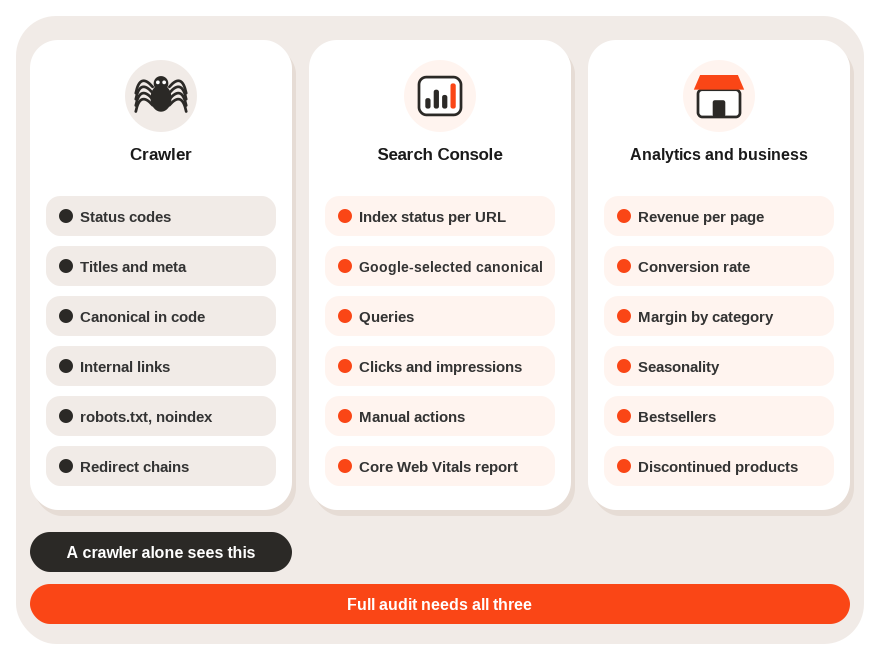
The most expensive problems are found in Search Console, in analytics and in a conversation about the business. An audit without Search Console access remains a guess, however neatly it’s formatted.
That’s why agencies ask for access along with the site address. Proper search engine optimisation relies on data you can’t see from the outside. But even the most accurate diagnosis changes nothing if nobody acts on it.
An audit that changes something
Not everyone has the patience to read an 80-page report to the end. A developer or content manager needs a task they can pick up and do.
So an audit that gets implemented is made of tasks. Each one has 4 parts.
- What to do. In one sentence, without vague wording.
- Where. Specific URLs or the page template it applies to.
- Why. Which problem it solves and which pages it will affect.
- How to check. What should change in Search Console or analytics for the task to count as done.
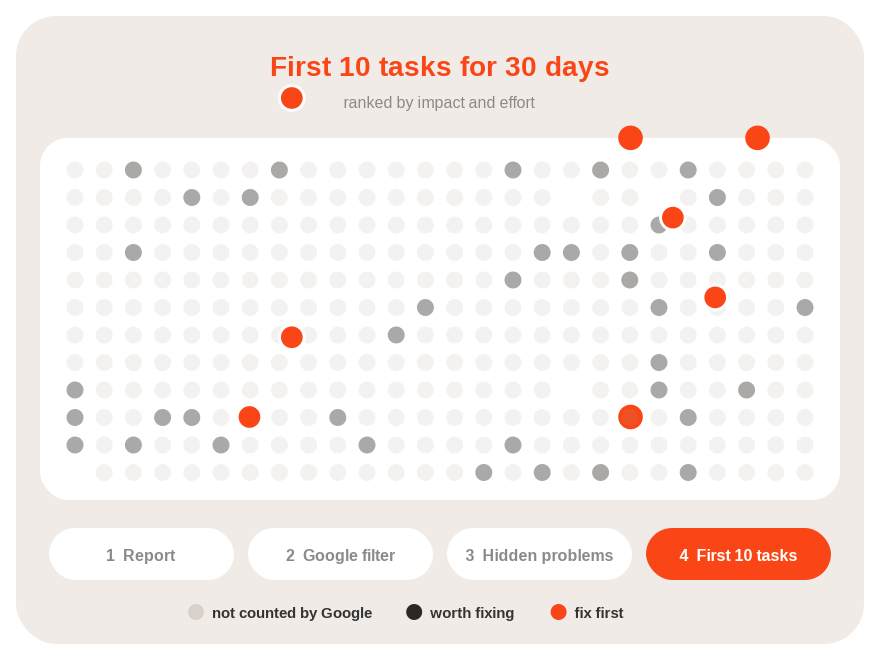
Tasks are ranked by impact and effort. Quick wins go at the top, nice-to-haves at the bottom.
The first 10 tasks get pulled out into a 30-day plan. There’s nothing magic about 10. You just can’t start on 300 items of equal weight.
And a month or two after implementation, someone comes back to check whether it worked. Without that step, an audit stays a hypothesis nobody tested.
The value of an audit shows in what changed on the site afterwards. The number of errors it found says nothing about that.
How to check the audit you were sent
If an audit is already sitting in your inbox, here are 6 questions that will quickly show what’s inside.
- Does it name the pages that bring you money?
- Did they ask you for Search Console and analytics access?
- Are the items ranked by importance, or are all 300 equal?
- Do the recommendations include text-to-HTML ratio, keyword density or “toxic” links?
- Does each task say how to check that it worked?
- Could you swap your site’s name for another and send the report to a different client without a single edit?
If the answer to the last question is “yes”, the rest hardly matters.
SEO audit FAQ
What should an SEO audit include?
Technical issues that genuinely get in the way of indexing, Search Console data, and an analysis of demand and of internal links to high-margin pages. Most importantly, a prioritised list of tasks, each saying what, where, why and how to check.
Does a health score affect Google rankings?
No. Google doesn’t use scores from third-party SEO tools. The score reflects how many technical issues a crawler found, although some serious errors behind it can get in the way of indexing.
Do you need to fix every error in an audit?
No. Some items, such as text-to-HTML ratio, meta keywords or keyword density, don’t affect rankings according to Google itself. Start with the tasks that have the most impact for the least effort.
Can you do an SEO audit without Search Console access?
You can, but it will only show what an external crawler sees. Indexing statuses, real queries and clicks are visible by default only to property owners and added users.
How often should you run an SEO audit?
It depends on how fast the site changes. A big audit makes sense after a redesign, a migration or a noticeable traffic drop, and in between, regular Search Console checks are enough.
While others fix their text-to-HTML ratio
A 300-item report feels like progress. A one-week task that brings traffic back to your highest-margin category makes money.
If you want an audit that leads to real changes on your site, talk to Advantrise. We’ll start with the pages that drive your sales, while your competitors are still padding descriptions out to 1,000 words.
Subscribe to our newsletter