content
The algorithm running your campaigns doesn’t see what you think it sees.
It sees exactly the signal you handed it. Nothing more.
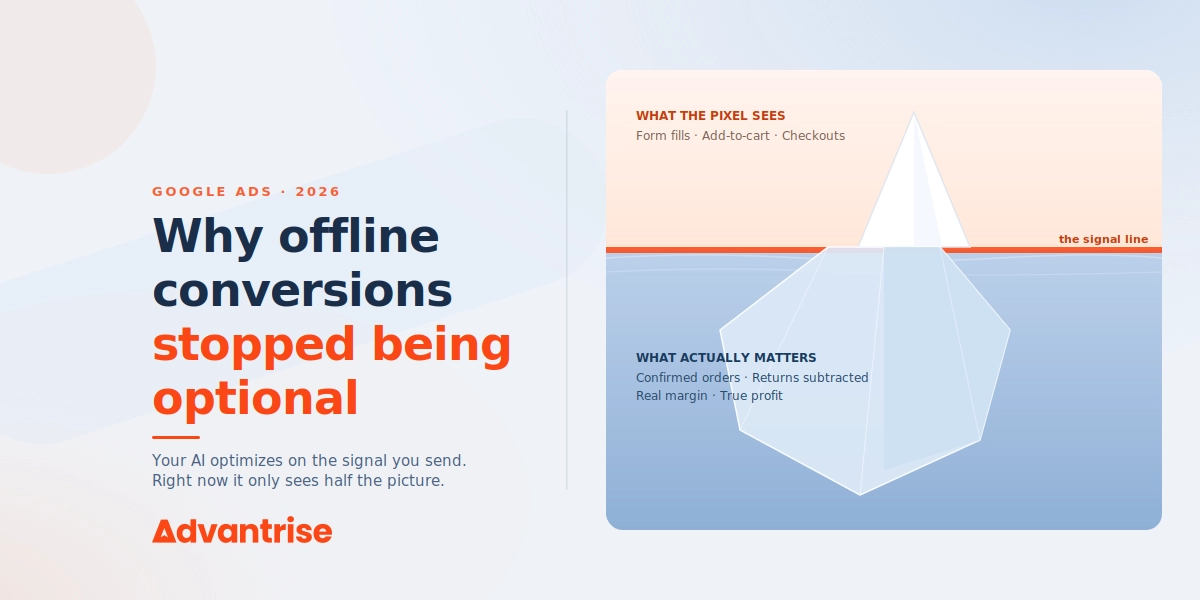
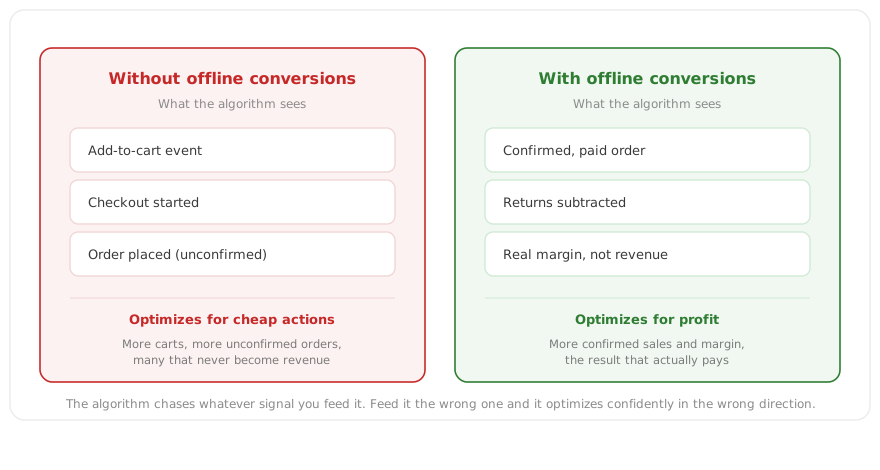
Feed it “someone submitted a form” or “someone added to cart,” and it will dutifully go find more people like that. Whether they actually bought, returned the item, turned a profit or a loss, the algorithm has no idea. And it won’t, until you tell it.
Offline conversions are how you tell it.
The topic isn’t new. It’s been covered a thousand times, and a few years ago it really was a feature for mature accounts, a nice bit of extra precision. In 2026 that changed. Not because a new technology appeared, but because of who now makes the decisions in your campaigns.
There used to be a person deciding which pages and bids to use. Now AI Max and Smart Bidding do it, optimizing automatically off one thing alone, the conversions you handed them. The signal became the fuel. Give it incomplete fuel and you get optimization that’s confidently wrong.
Below, we at Advantrise break down why offline conversions stopped being an edge and became basic hygiene, and how to set them up for eCommerce, even if you’re still on the fence about whether you need them.
What offline conversions are, in brief
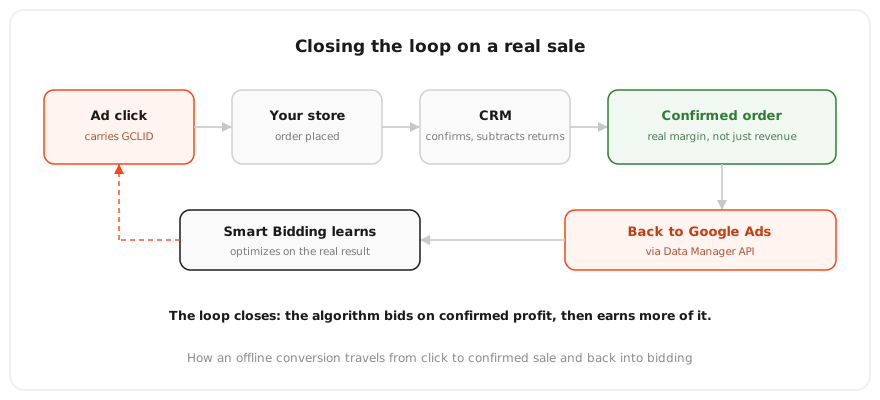
An offline conversion is an event that happens after the click but outside the browser session, sent back into Google Ads. The user clicked the ad, and the real outcome came later: the order was confirmed at the warehouse, the payment cleared, a rep closed the sale by phone, the customer didn’t return the item within two weeks. Google ties that event back to the original click using the GCLID or hashed first-party data.
GCLID (Google Click Identifier) is a unique tag Google appends to the URL when someone clicks an ad. It’s what lets a later offline event attach to a specific click and campaign.
For eCommerce, the line between an online conversion and an offline one is thinner than it looks. A typical store assumes everything is online. The shopper paid on the site, the conversion is counted. But the real business outcome differs from the event the pixel sees. The pixel sees “payment placed.” It doesn’t see the cancellation an hour later, the return a week later, the real margin after cost of goods and shipping. An offline conversion lets you send back not the payment event but a confirmed, cleaned-up result, the real order, the real value, the real profit.
That makes offline conversions a foundation of modern Google Ads management, not a cosmetic add-on. If you want the algorithm to optimize for money rather than for the count of checkouts, you have to feed it money, not checkouts. That’s why our Google Ads management work starts with an audit of what signal the account is actually sending, before touching bids or creatives.
Why this became critical right now
The idea of offline conversions is old. What’s new is everything that shifted around it over the past year. Three 2026 changes together turned an option into a requirement.
The first change is the biggest. AI now makes most of the decisions in the account, and it optimizes strictly on the signal you sent. Smart Bidding decides bids, AI Max decides queries and pages. Neither of them knows your business. They know only the conversions you dropped into the “Conversions” column. If what’s in there is form fills and carts, the algorithm will methodically scale up form fills and carts, including the ones that never become a sale. An incomplete signal used to just skew the reports a little. Now it directly steers where your budget goes.
The second change has a date on it. As of June 15, 2026, Google moved offline conversion import and Enhanced Conversions for Leads onto the Data Manager API and blocked the old path through the Google Ads API. Accounts that were actively importing before that date can keep going while they migrate. Anyone who wasn’t importing will hit an access error trying to start the old way. Separately, since April 2026 Enhanced Conversions for web and for leads have been merged into a single setting, and Google now accepts first-party data from site tags, Data Manager, and the API at the same time.
The Data Manager API is Google’s new unified path for sending data into its advertising products. It replaces the scattered older import methods and becomes the single entry point for offline conversions and first-party data.
The third change is in the background, but decisive. Third-party cookies are effectively dead, browsers are cutting client-side tracking, and first-party signal is the only reliable input left. Offline conversions and Enhanced Conversions are exactly that, first-party signal. What used to be one way to sharpen accuracy is now one of the few ways to see the result at all.
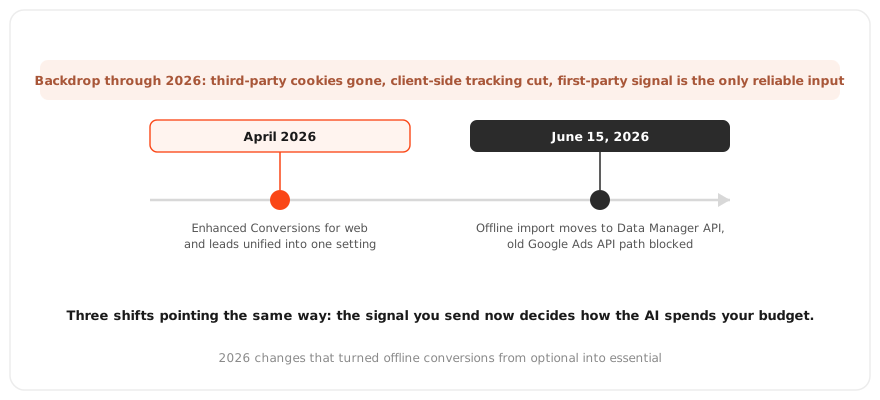
All three changes point the same way. The signal you give the platform matters more than ever, because it’s what the algorithm spending your money learns from.
Consent Mode v2: the foundation nothing else works without
Before we get to setup, you have to deal with what sits underneath offline conversions. Both offline import and Enhanced Conversions depend on a properly configured Consent Mode. If it’s broken, you’ll be carefully sending a signal that arrives nowhere.
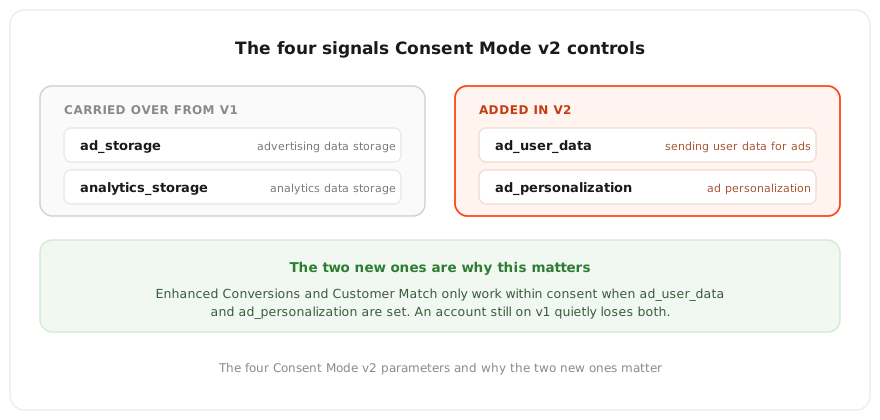
Consent Mode is the mechanism that tells Google which data you’re allowed to collect, based on the user’s choice in the consent banner. Version v2 runs on four parameters:
- ad_storage controls storage of advertising data.
- analytics_storage controls storage of analytics data.
- ad_user_data controls sending user data for advertising.
- ad_personalization controls ad personalization.
The last two were added in v2 specifically, and they’re what Enhanced Conversions and Customer Match need in order to work within consent. An account still on the old version quietly loses both.
Cookieless pings are anonymous signals with no personal data that the tag sends Google when a user has declined consent. They don’t identify the person, but they report that an event happened and give the algorithm material to model with.
Here’s a fork that decides more than the documentation lets on. Consent Mode has two modes.
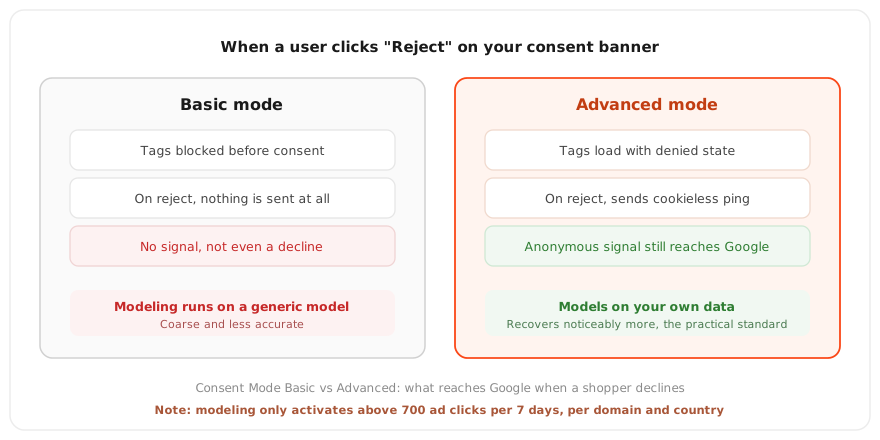
Basic mode blocks all Google tags until the user gives consent. If they decline, nothing is sent, not even the decline itself. Conversion modeling in that case runs on a generic model, coarse and imprecise.
Advanced mode loads tags right away with a default “denied” state and sends cookieless pings before the user even chooses. If the person declines, the tags still send an anonymous signal that the event happened. That gives Google material to model the lost conversions on your own data rather than a generic one. Advanced recovers noticeably more, and for a business that depends on ads, it’s effectively the standard.
And here’s the uncomfortable truth most guides skip. Modeling doesn’t switch on automatically. Google requires a threshold: at least 700 ad clicks over 7 days for each domain-and-country pair. If your store doesn’t clear that threshold, Google Ads will show a “Consent mode implemented” status, but modeling won’t run and there will be no recovered conversions. For a large store on a single market this isn’t an issue. For a mid-sized store selling across several countries, the threshold is counted separately per country, and clearing it gets genuinely hard. This is something to know in advance, not discover after the fact while staring at an empty modeled-conversions column.
One more trap, small-looking and expensive in its consequences. The consent banner is not Consent Mode. The banner records the user’s choice in the browser. Consent Mode is a separate layer that passes that choice to Google’s tags. You can have a polished banner, a green status in Tag Assistant, and still not pass consent through. The site looks healthy while the signal isn’t flowing. So any setup is worth verifying with a real run-through, not by how the interface looks.
How to set this up for eCommerce
Now the practical part. Order matters, because each step builds on the one before it. Start with the easiest and highest-impact, not with the hardest.
Step one, define the real conversion. Not “added to cart,” not “started checkout,” but a confirmed order. If you have a stage where an order is genuinely confirmed, paid, and not cancelled, that’s the one that should be the primary conversion your bidding optimizes toward.
Step two, turn on Enhanced Conversions. This is the place to begin, because it’s the easiest step and gives an immediate accuracy bump. The tag sends a hashed email or phone number the shopper leaves at checkout, and Google matches it against logged-in users. Per Google, moving from GCLID-only import to adding first-party data delivers a median 10 percent lift in recorded conversions.
Enhanced Conversions is an addition to standard tracking that sends Google hashed first-party data from the shopper, email or phone, in a privacy-safe way. It improves how accurately a conversion ties back to the click, especially when cookies aren’t available.
Step three, set up the import of confirmed orders from the CRM. This is where real closed orders with their GCLID go, returns subtracted. This is also where most of the common mistakes live. A conversion name that doesn’t match character for character, a timestamp in the wrong format or timezone, a missing GCLID on some records. A single bad row can reject the whole file, so the format is critical.
Step four, move to the Data Manager API. After the June 15, 2026 deadline, the old path through the Google Ads API is closed. If you’re only starting now, start on Data Manager directly so you’re not building on a deprecated foundation. The CRM connection can run through ready-made connectors or an automated import, so the data refreshes regularly rather than by hand once a month.
Step five, send real value, not revenue. For value-based bidding, what matters isn’t the order total, it’s the margin. The product with the best revenue-ROAS can be a loss-maker on margin. If you send true value, the algorithm optimizes for profit rather than turnover.
Step six, wait before making the new conversion your primary bidding goal. Let it accumulate volume over one or two conversion cycles before you put it in the column Smart Bidding optimizes toward. And keep the threshold in mind. Smart Bidding runs reliably from roughly 30 to 50 conversions per month per campaign. Below that the algorithm is short on signal, and its behavior turns erratic.
Setting up offline conversions for a store is a few days of work, not a few weeks. But it’s technical, and every small thing, from timezone format to the modeling threshold, can quietly break the whole chain. That’s why within our eCommerce PPC management we build a clean data flow first and scale budgets second, because scaling a campaign on a broken signal just means burning money faster.
FAQ about offline conversions for eCommerce
Do I need offline conversions if I run a classic store with online payment?
Yes. Even with fully online payment, the pixel records the checkout, not the outcome. It doesn’t see cancellations, returns, or real margin. An offline conversion lets you send back the cleaned-up result, so the algorithm optimizes for profit rather than for a count of checkouts, some of which will fall away.
How is Enhanced Conversions different from offline import?
Enhanced Conversions supplements an online conversion with hashed first-party data from checkout to tie it back to the click more accurately. Offline import sends an event that happened later and off-site, such as a confirmed or closed order. They aren’t interchangeable, they complement each other, and Google recommends starting with Enhanced Conversions.
What happened on June 15, 2026, and does it affect me?
Google blocked the old path for importing offline conversions through the Google Ads API and moved everything to the Data Manager API. It affects you if your import is set up through the old integration. If you use a CRM connector or a third-party tool, check with your provider which path you’re on right now.
How many conversions does Smart Bidding need to run reliably?
The benchmark is roughly 30 to 50 conversions per month per campaign. Below that the algorithm is short on signal and behaves unstably. So early on, the offline conversion is kept secondary and earlier funnel stages are added while the main conversion builds up volume.
Is it enough to just turn on Consent Mode?
No. Consent Mode in Advanced mode provides the material for modeling, but the modeling itself only kicks in above the threshold of 700 ad clicks over 7 days per domain-and-country pair. Below the threshold the status will read “implemented” while no modeled conversions appear. Consent Mode is a necessary condition, not a guarantee.
What to do with all of this
It comes down to one thing. AI now decides more in your campaigns than ever, but it decides exactly as well as the signal you give it. Send it checkouts, and it finds more checkouts. Send it confirmed profit, and it goes looking for more profit. Offline conversions stopped being an advanced-user advantage and became basic hygiene, without which the rest of your optimization runs blind.
All of this can be set up on your own. Enhanced Conversions, CRM import, Data Manager, sending margin instead of revenue, these are all available tools. But there are a lot of failure points here, and each one is quiet. The modeling threshold that silently never engages. The migration deadline that’s easy to miss. The timezone format that rejects an entire file. The banner that looks healthy but doesn’t pass consent. Each of them costs not rankings but real budget, spent optimizing against an incomplete signal.
If you’re not sure what signal your account is sending right now, or whether it’s arriving at all, Advantrise will start with a check of the data, because as long as the algorithm is learning from half the picture, any scaling only accelerates the losses.
Subscribe to our newsletter