
content
At 1:40 PM on the first day of the sale, the ads disappeared. Why? That’s the kind of question online stores open with when they talk to us about the next sale season, and this year there’s one more. Should you turn on Google Ads promotion mode?
The rest of the questions come with last season’s report. Why did orders go up while profit went down? Why did bids stay at sale levels for 4 days after the sale ended? Where did the clicks for products the store doesn’t even sell come from? And where did 3 days of conversions go when orders kept coming in?
The answers mostly sit in bids, budgets or tracking. That’s why reviewing the previous season is our first step in eCommerce PPC management for a new client.
Last year the answers were simpler.
| What the report shows | Cause | What has changed since |
|---|---|---|
| Ads disappear mid-day | The daily budget ran out in the first hours of the sale | Campaign total budgets arrived for Search, Performance Max and Shopping |
| More orders, less profit | The target was loosened without recalculating margin after the discount | Promotion mode sets ROAS tolerance in advance, for specific dates |
| Sale bids linger for days after the sale | Manual changes were never rolled back | Promotion mode reverts the settings on its own |
| Clicks on irrelevant queries | Broad match with no oversight or negative keywords | Some Search campaigns were moved to AI Max automatically |
| 3 days without conversions | A tag broke after a site update | Nothing. Data exclusions are still the main safeguard |
The right column is the plan for this article. We’ll start with this year’s changes, each followed by a short note on what’s different from last season. Microsoft Ads gets its own section, since it went the other way this time. At the end come 2 checks that don’t age.
What is promotion mode in Google Ads
Promotion mode is a scheduled setting for demand peaks. You set the sale dates, and for that period the campaign gets a lower ROAS bar and extra daily budget, both of which you configure yourself. The window runs from 3 to 14 days, after which the campaign goes back to its usual settings.
ROAS tolerance is how far, in percent, the algorithm may go below your tROAS. Google explains it using Smart Bidding Exploration as the example. A tROAS of 200% with a 10% tolerance gives an effective target of 180%.
Manual changes for a sale are like an iron you have to remember to switch off. Promotion mode works more like an oven timer. It turns itself off even if the whole team spends Monday buried in reports.
Who can use it? Not everyone yet. It’s a beta for Search and Performance Max campaigns, and Google describes it in terms of ROAS tolerance, so treat it as a tool for Target ROAS campaigns. If you don’t see it in your account, Google suggests contacting your account team.
Last season promotion mode was a closed test for a handful of advertisers and only worked together with campaign total budgets. Since June 2026 it has been a beta for Search and Performance Max, and it now works with daily budgets too.
Promotion mode or seasonality adjustments
These 2 tools are easy to mix up. Both have start and end dates, and after both the campaign returns to normal on its own. The difference is which lever they pull.
Seasonality adjustments tell the algorithm that conversion rates are about to change for a while. It’s like warning a shop assistant that Saturday will be busy. Promotion mode is closer to opening 2 more tills and selling at a thinner markup for a few days. Here the target and the budget are what move.
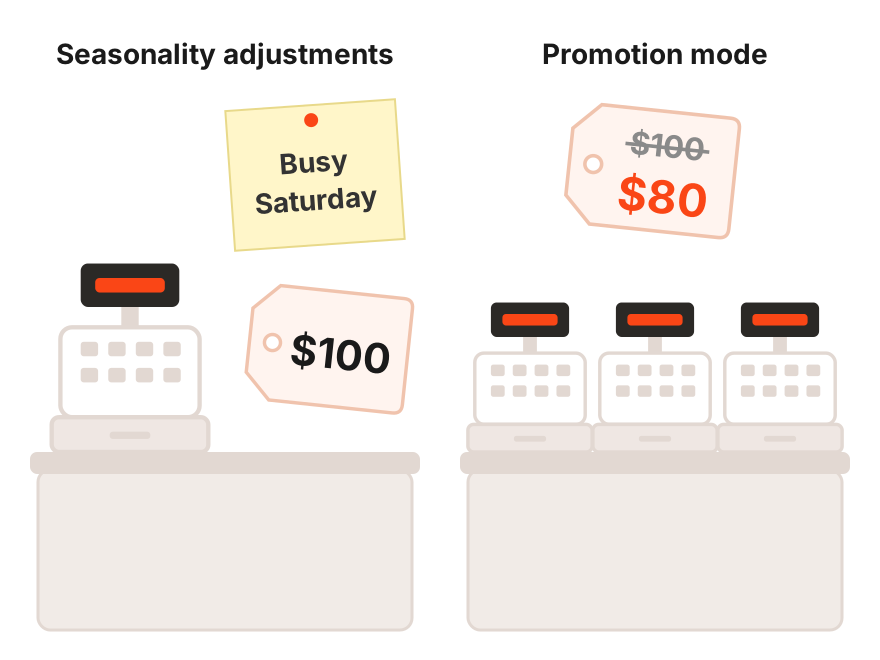
How do you choose? If conversion rates will rise on their own and your usual ROAS works for you, a seasonality adjustment is enough. If you’re deliberately willing to earn less per dollar in exchange for volume, you need promotion mode. The table below puts 3 ways to prepare a campaign for a peak side by side.
| Promotion mode | Seasonality adjustments | Campaign total budgets | |
|---|---|---|---|
| What it changes | ROAS tolerance and daily budget | Expected conversion rate | Total spend for the period |
| Duration | 3 to 14 days | Best for 1 to 7 days | 3 to 90 days |
| Campaigns | Search, Performance Max (beta) | Search, Shopping and Display on tCPA or tROAS, Performance Max | Search, Performance Max, Shopping, Demand Gen, YouTube |
| After the sale | Reverts automatically | Reverts automatically | The campaign has an end date |
| When to use | You accept lower ROAS for volume | You expect a sharp change in conversion rate | You have a fixed amount for the sale |
A target you can’t change mid-sale
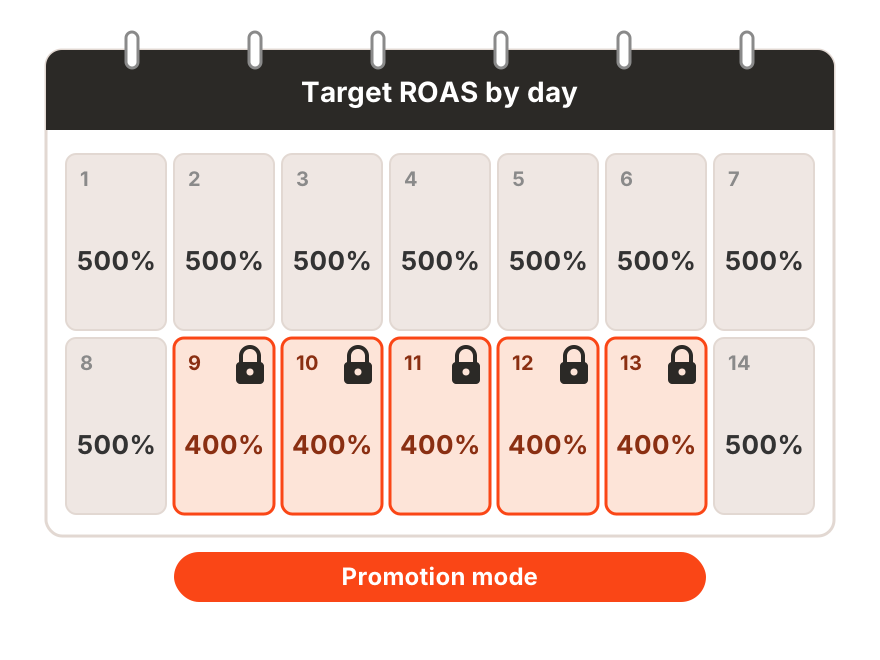
While promotion mode is active, the base tROAS can’t be edited. Google Ads shows a notice and offers to change only the tolerance. Sounds minor? On day 1 of the sale, when the numbers start to surprise you, it becomes the main constraint.
Try a hypothetical with round numbers. Your usual tROAS is 500%, and for a 5-day sale you set a 20% tolerance. If tolerance works the same way as in Google’s Smart Bidding Exploration example, the effective target for those days is 400%. That’s $4 in revenue per $1 of spend instead of $5.
Now the caveat. The discount has already eaten part of your margin, and a lower ROAS takes another bite. Check before launch whether there’s still profit at 400%. If there isn’t, lower the tolerance. Google does let you change it while the promotion is running.
A total budget instead of a daily one
Remember the ads that vanished at 1:40 PM? A daily budget is sized for an ordinary day, and during a sale it may last only half of one. Campaign total budgets set one amount for a period of 3 to 90 days, and Google paces it so the full amount is used by the end date.
There’s a catch. You can only choose a total budget when creating a new campaign, so the sale campaign has to be built ahead of time. Promotion mode’s ROAS tolerance does work with this budget type.
Last season total budgets were available only in Demand Gen and YouTube campaigns. Since January 2026 they’ve been in open beta for Search, Performance Max and Shopping.
When a campaign hits its budget
This change is easy to miss. It doesn’t switch anything on or off, yet it changes how campaigns you haven’t touched in months behave.
Until recently, a campaign marked Limited by budget on tCPA or tROAS often beat its target. Google’s own example has a Target CPA of $10 and an actual cost per conversion of $5. Since August 17 these campaigns stick closer to the target, and in that example the actual CPA moves toward $10.
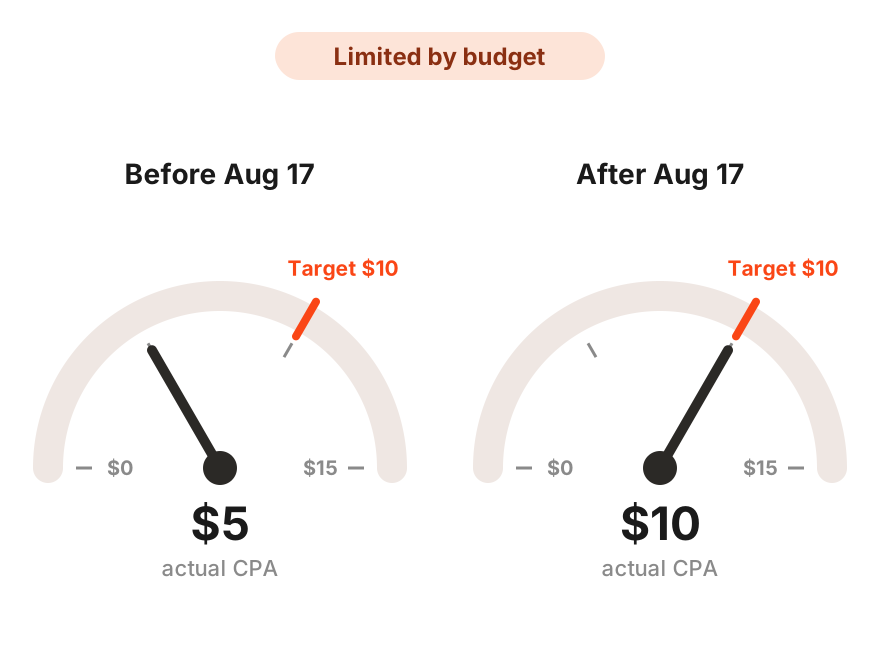
What should you do before the sale? Compare actual CPA or ROAS over the last 1 to 2 months with the target, and enter the result you want at full spend. Google won’t change targets for you, but campaign settings include a Target adjustment tool with performance history.
Last season a budget cap often left room to beat the target. Now the target you entered is the result the algorithm aims for. Campaigns that aren’t limited by budget are not affected.
Smart Bidding Exploration on peak days
Smart Bidding Exploration runs on the same ROAS tolerance, only permanently and without dates. The algorithm gets room to buy queries that didn’t fit the target before, and that’s how it finds new customers.
This year the tool moved beyond Search. It’s available for all Performance Max campaigns without a product feed, and a beta has opened for Shopping ads. Google notes that Exploration works best without budget constraints. During sale season, though, the budget is often exactly what campaigns run into.
Should you run it alongside promotion mode? Google hasn’t documented how the 2 behave together in one campaign. So don’t switch Exploration on for the first time a week before a sale. The sale effect will blend with the new-traffic effect, and you won’t be able to separate them in reports.
Last season Smart Bidding Exploration worked only in Search campaigns on Target ROAS. Now it covers Performance Max without a feed, with a beta for Shopping ads.
AI Max and search queries at peak
Remember the clicks for products the store doesn’t sell? This season there may be more of them. In September Google automatically moved Search campaigns with 2 legacy settings to AI Max, and some of them now serve on queries beyond your keywords.
Campaigns with automatically created assets got search term matching and text customization. Campaigns with campaign-level broad match got search term matching only. Not sure whether this touched your campaigns? Check the AI Max settings before the sale starts.
During the sale, open the search terms report daily, because once a week isn’t enough on peak days. Text that Google generated is marked Google AI in the Added by column of the asset report. Review it before launch so it matches the terms of the promotion.
Last season automatically created assets and campaign-level broad match were separate settings. Now they’re part of AI Max, and you can no longer create them the old way. Dynamic Search Ads move to AI Max later, starting in February 2027.
Remarketing after the move to Demand Gen
Google is moving Display campaigns into Demand Gen. The migration tool has already appeared in eligible accounts, and the remaining campaigns will be moved automatically later. Google expects the transition to be complete by 2027.
What gets left behind? Demand Gen doesn’t support seasonality adjustments, bid adjustments or portfolio bidding. Manual CPC becomes Target CPC, Pay for conversions becomes Target CPA, and a migrated campaign can’t be switched back to Display.
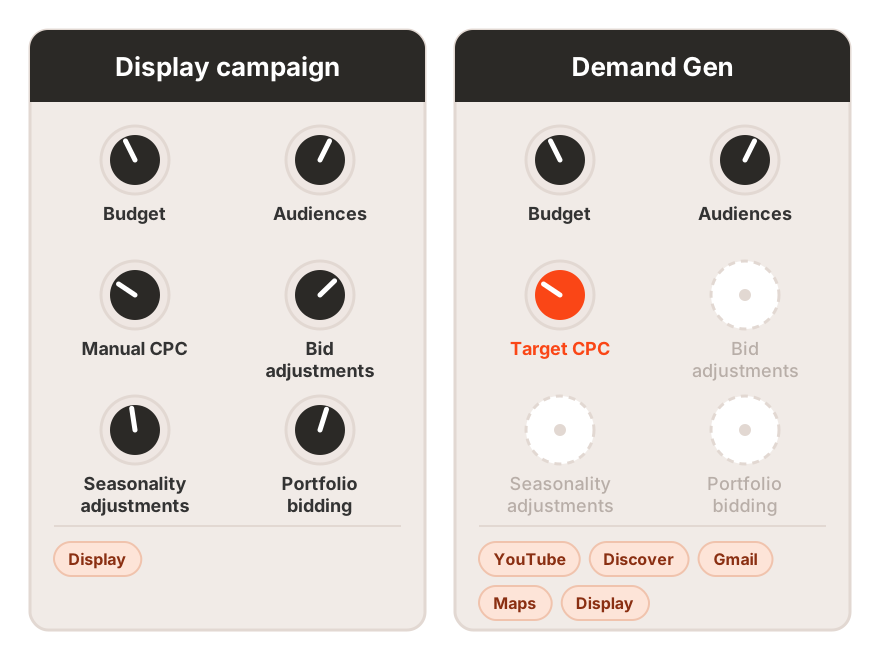
If your seasonal remarketing relies on seasonality adjustments or manual bids, don’t migrate it a few weeks before a sale. Moving right before a peak is like renovating the kitchen the day before a holiday dinner. It’s safer to test Demand Gen in parallel and migrate after the season.
Last season Display was a campaign type of its own, with its own adjustments. Now it’s becoming a channel inside Demand Gen, and some familiar levers don’t make the move.
Microsoft Ads plays by different rules
What about Microsoft Ads? The logic here runs opposite to Google’s. Campaigns can still beat their tCPA or tROAS even when limited by budget, because Microsoft treats targets as directional levers for balancing volume and efficiency.
The second change affects sale campaigns, which are often built from scratch. Since October 1, 2026, new campaigns on Maximize Conversions with Target CPA, Maximize Conversion Value with Target ROAS and Maximize Clicks are created without Max CPC. Existing campaigns and portfolio strategies keep the setting.
Need a cap on cost per click for a sale? Build the campaign on a portfolio bid strategy. AI Max has also arrived in Microsoft Ads, but as an option you turn on yourself. Microsoft hasn’t announced any automatic upgrade.
Last season you could set Max CPC in any new Microsoft Ads campaign on these strategies. Now new campaigns without a portfolio strategy don’t have it, and budget-limited campaigns behave differently in Microsoft and Google.
Tracking that breaks at the worst moment
This is the dullest check on the list, which is probably why it gets skipped. Before the sale, place a test order through every payment method and confirm the conversion reached Google Ads. Smart Bidding learns from whatever signal it gets, right or wrong.
What if a tag breaks mid-sale anyway? Add data exclusions as soon as possible. Exclusions work on clicks, so cover the days before the outage too, allowing for conversion delay. Once an exclusion is applied, don’t remove it, even after the data is fixed.
Scheduled site maintenance is known in advance. For that, you can set an exclusion ahead of time.
Landing pages at peak click prices
On sale days a click often costs more, so a landing page mistake costs more too. Send sale traffic where the discount is visible right away. A homepage with the banner 3 screens down doesn’t do that job.
After the sale, roll everything back just as carefully. An ad promising yesterday’s discount that lands on a page without it costs you money and trust.
Google Ads promotion mode FAQ
Is promotion mode available in every account?
No. It’s a beta that Google is opening gradually. If you don’t see it in campaign settings, Google suggests contacting your account team.
How long can promotion mode run?
From 3 to 14 days. The end date is set up front, and after it the campaign returns to its usual settings on its own.
Can you change tROAS while promotion mode is active?
Not the base tROAS. Only the ROAS tolerance can be changed, so review the target before the sale starts.
Does promotion mode work in Shopping campaigns?
In the beta Google lists only Search and Performance Max. For Shopping, seasonality adjustments and campaign total budgets remain the options.
Can promotion mode be combined with seasonality adjustments?
We haven’t found Google documentation on how the 2 interact in one campaign. So for a single sale it’s more sensible to pick one and judge its results on their own.
Where to start a month before the sale
Start with the calendar. Mark every sale, from Black Friday to your own promotions, and decide for each whether you want volume or steady efficiency. That decides what to turn on, promotion mode or a seasonality adjustment.
Next, check the targets in budget-limited campaigns, the AI Max settings and the tracking. Build sale campaigns with total budgets in advance, since you can’t add one to an existing campaign.
Once promotion mode starts, the base target is locked, so every week of delay narrows your room to maneuver. If you’d like to go through this list with a team that does it every season, talk to Advantrise. We’ll review the account before the peak, when clicks usually get more expensive.
Subscribe to our newsletter