content
Most PPC specialists know Search Console exists. Many even have access to it. But in everyday account work it usually sits in the same mental drawer as SEO audits, sitemap issues, and other things someone else will handle. Then spend starts climbing, search terms get messier, and a campaign that looked fine in the brief begins to drift in production.
That is usually the moment teams go deeper into Google Ads. They check match types, search terms, Quality Score, bidding, maybe even the weather. Search Console still stays closed. Which is odd, because it answers a very practical question: what language does the market use when Google is not filtering demand through your keyword list?
For PPC, that matters more than position tracking ever will. Search Console shows the phrasing people actually use, the pages Google already considers relevant, and the places where intent and landing page are slightly out of sync. That is useful long before anyone talks about rankings.
What Search Console shows that Google Ads does not
Google Ads is excellent at showing what happened inside the paid setup you created. You can see the keywords you chose, the queries Google matched, the clicks you paid for, the conversions you recorded. But that view is shaped by your own targeting choices. It is demand after it has already passed through bidding, match types, budgets, and campaign structure.
Search Console gives you a wider field of view. It shows queries you are not bidding on, queries that are landing organically on pages you would never have picked for paid traffic, and commercial modifiers that keep appearing even though no one has built campaigns around them yet.
That difference is useful in both directions. Sometimes it shows demand you are missing. Sometimes it shows demand you should keep far away from your budget. One skincare account, for example, kept surfacing for informational phrases around ingredient routines and usage order. The paid account was built for product sales, not education. Search Console made the mismatch obvious before broad match had a chance to turn that curiosity into billable clicks.

The metrics worth your attention
You do not need a grand theory of Search Console to use it well for PPC. Four metrics do most of the work.
Impressions tell you where demand exists. A query can generate plenty of impressions and very few clicks. That is not useless traffic. It usually means Google sees relevance, but users are not convinced by the page or snippet. For PPC, that is often a sign to test the intent with tighter copy or a more specific landing page.
CTR is where things get interesting. In Search Console, CTR is less about ad craft and more about whether users recognize the page as a fit. Healthy impressions with weak CTR usually point to a mismatch: the page is too broad, the wording is too vague, or the promise is hiding in the wrong place.
Clicks show where organic is already carrying some weight. That does not automatically mean you should stop bidding. It does mean you can make a more sober decision about whether paid coverage adds control and conversion lift or just buys traffic you were likely to get anyway.
Average position belongs in the room, just not at the head of the table. It is context, not a performance target for PPC. Use it to understand visibility. Do not turn it into a bidding philosophy.
One more practical note: compare 28-day periods. Day-to-day swings are noisy. Week-to-week can still be misleading in seasonal accounts. Twenty-eight days usually gives you enough signal to act without reading tea leaves.
Start with Queries, then sanity-check Pages
The Queries report is the fastest way to understand how real users phrase intent. Not how your keyword list imagines demand should look. Not how the category tree is organized. The actual words.
That is where you find the modifiers that matter: “for oily skin,” “travel size,” “refill,” “best under 50,” “shipping,” “review,” “how to use.” Some of those belong in campaigns. Some belong in negatives. Some belong in a brief for a landing page that does not exist yet.
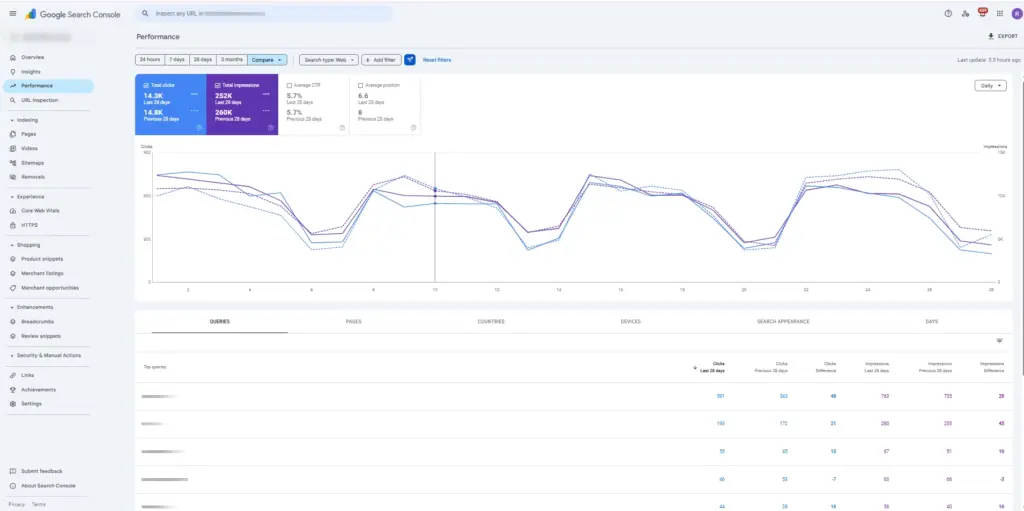
Then move to Pages. This is the step PPC teams skip too often. A page with healthy impressions and weak CTR is quietly telling you that Google sees relevance, but users do not fully buy the match. If you plan to send paid traffic there, treat that as an early warning, not an SEO footnote.
In one consumer electronics account, a broad accessories category kept appearing for highly specific compatibility queries. Search Console showed the pattern before paid search exposed it at scale. The fix was not a smarter bid. It was a better destination: a tighter landing page and more explicit compatibility language on the first screen.
Build negative keyword logic before Google Ads teaches you the expensive way
Most accounts build negative keyword lists reactively. A campaign runs, the search terms report fills up with nonsense, and someone cleans the mess a week later. That process works, but it charges tuition.
Search Console helps you spot many of those bad-intent clusters in advance. Informational modifiers are the easy ones: “how to,” “what is,” “benefits,” “routine,” “review,” “ingredients.” If your pages surface for them organically, the demand exists in your market. If your paid campaign is built for transactions, those queries deserve scrutiny before launch, not after the invoice.
The same applies to post-purchase and support language. Queries around refunds, tracking, cancellation, returns, or customer service can show up around commercial pages more often than teams expect. Broad match does not always need much encouragement to turn them into spend.
Then there are account-specific mismatches. Consumer brands see wholesale terms. Premium products attract “cheap” and “dupe” language. B2C stores get supplier intent. This is where Search Console becomes less of a report and more of an early warning system. It lets you build themed negatives from demand patterns instead of swatting random search terms one by one like flies in July.

Choose landing pages with intent, not intuition
Paid search teams are often too polite with landing pages. The page feels close enough, so it gets the traffic. Search Console is very good at ruining that comfort.
When a page earns plenty of impressions but weak CTR, Google is effectively saying, “I can show this page for the query, but users are not impressed.” That has obvious implications for paid traffic. If organic users hesitate before the click, paid users will often hesitate after it.
The pattern shows up all the time in ecommerce. Narrow, high-intent queries are routed to a broad category page. Comparison-style queries land on a PDP. Early research queries end up on hard-sell pages that assume the buying decision is already done.
A simple rule of thumb works well here. Queries that sound transactional, such as “buy,” “price,” “in stock,” or “shipping,” usually need a category page or PDP. Comparison language often needs a category with strong filtering or a guide that helps narrow the choice. “How to choose” queries are better served by educational pages with a soft commercial bridge. If the page type is wrong, no amount of copy polish will save the conversion path.

Search Console gives PPC a better writing brief
A lot of ad copy still starts from internal language. The brand knows what the product is, what the offer is, what tone it wants to use, and then the ad gets written. Sometimes that works. Often it produces copy that sounds fine on a brief and forgettable in an auction.
Search Console gives you a wider field of view. It shows queries you are not bidding on, queries that are landing organically on pages you would never have picked for paid traffic, and commercial modifiers that keep appearing even though no one has built campaigns around them yet. Integrating this kind of insight into campaign decisions is part of what separates reactive Google Ads management from a proactive, data-driven approach.
When the same phrasing keeps showing up, it usually deserves a job. Problem modifiers such as “for sensitive skin” or “for dull skin” sharpen relevance. Format and size terms reduce hesitation. Trust language, if users actively search for it, can strengthen the ad and the landing page at the same time.
There is one condition. If the ad promises a modifier, the landing page has to confirm it quickly. “Oil-free” buried three scrolls down is not proof, it is bait. The cleaner the alignment between query, ad, and first screen, the less work your campaign has to do later.
Separate brand and non-brand before they distort the story
Search Console is also useful when brand bidding debates begin to loop. Teams tend to discuss brand and non-brand performance as if they belong to the same weather system. They do not.
Brand queries usually have stronger CTR, clearer intent, and simpler paths to conversion. Non-brand queries carry more discovery, more ambiguity, and more pressure on the landing page. Mix them together and almost any report starts to look healthier than it really is.
Filtering brand queries in Search Console gives you a cleaner baseline. You can see how much organic brand coverage you already own, whether competitors are likely to be a problem, and where paid coverage adds control rather than vanity. On the non-brand side, you get a clearer view of genuine discovery demand and the modifiers attached to it.
Search Console will not settle every internal argument about branded spend. It does, however, remove a lot of theater from the conversation.
A 30-minute workflow that actually gets done
This only works if it becomes a habit light enough to survive a busy week. Thirty minutes is enough.
Spend the first ten minutes in Queries. Compare the last 28 days with the previous period. Flag new clusters, rising modifiers, and phrases that clearly belong in negatives.
Spend the next ten minutes in Pages. Look for URLs with strong impressions and weak CTR, especially in commercial sections. Ask one blunt question: if we paid for this click today, would this still be the page we want?
Use the last ten minutes to turn observations into actions. Add a few negatives. Draft two or three new RSA headlines using language you saw repeatedly. Note one landing page test. Park one query cluster for future campaign expansion. That is enough. You are building a sharper account, not a shrine to process.
Where PPC teams misread Search Console
The most common mistake is treating Search Console CTR like Google Ads CTR. They are related, but they do different jobs. Ads CTR tells you how the ad competes in the auction. Search Console CTR tells you whether the page and snippet look like a good answer.
Another mistake is reading average position as if it were a paid metric. It is useful background, but it should not steer campaign decisions on its own.
A third mistake is skipping device splits. A page can look perfectly respectable in aggregate and still underperform badly on mobile, which matters a great deal if most paid clicks land there.
And then there is the classic reporting error: blending brand and non-brand queries into one tidy average. Tidy averages are comforting. They are also how weak non-brand decisions hide behind strong branded demand.
What changes once this becomes routine
Used properly, Search Console does not replace keyword research, search terms reports, or campaign analysis. It makes each of them less speculative.
The payoff is usually quiet. Fewer irrelevant clicks. Better landing page choices. Ad copy that sounds closer to the customer and less like a workshop exercise. Cleaner conversations about where paid search adds value and where it is simply occupying space.
That is usually how the best account improvements arrive anyway. Not with fireworks. Just fewer bad decisions repeated over time.
If you want to build this logic into your Google Ads workflow, get in touch with Advantrise.
Subscribe to our newsletter